

Units
Units
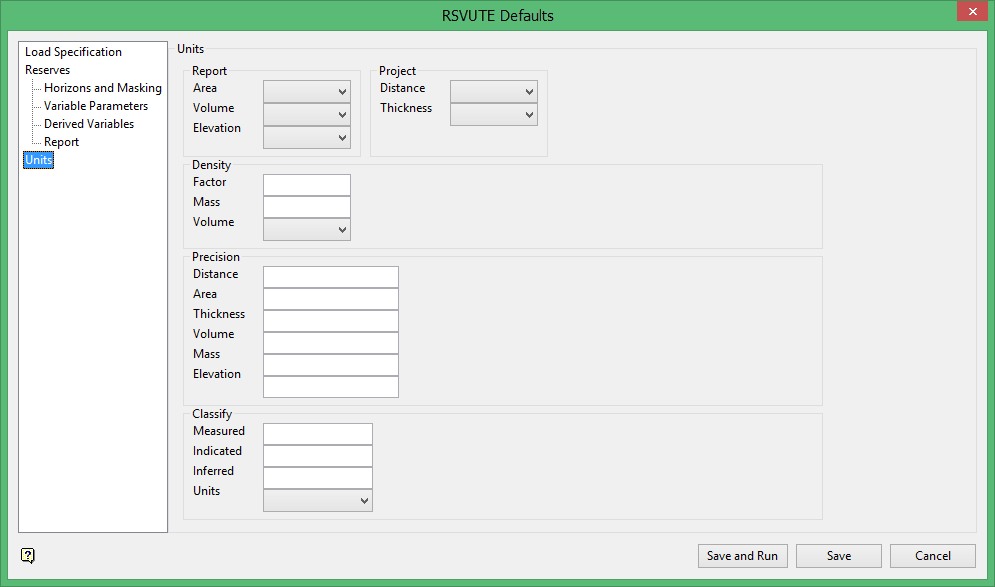
Use the Units option to set the units in which the grids are stored and the units to be reported.
To run this option from the command line, type:
UNITS /volume=units /area=units /distance=units /thickness=units /elevation=units
For example, UNITS /volume=Yards /area=Feet /distance=Feet /thickness=Feet /elevation=Feet
Report
Area
Select the area unit, which is used during reporting.
Volume
Select the volume unit, which is used during reporting. Overburden, interburden and volumetric variables are all reported as volume (coal is converted to a tonnage) as specified in the Density option.
Elevation
Select the elevation units. Incoming elevation units are typically the same as the distance and thickness units.
Project
Distance
Select the distance unit. The distance unit should be the same as that set in the project specification file (.dg1). If these units are different, then the distance unit chosen through Rsvute will be used in calculations instead of the units stated in the .dg1 file.
Thickness
Select the thickness unit. Incoming thickness units are typically the same as the distance unit. The chosen Rsvute thickness unit will be used in calculations instead of the units stated in the .dg1 file.
Density
Use the Density option to set the factor used for the conversion of coal volume. Typically this would be for conversion of coal volume to a tonnage.
To run this option from the command line, type:
PDENSITY /volume_units=value /mass_units=value /factor=value
Example: DENSITY /volume_units=Feet /mass_units=tons /factor=0.04.
Factor
Enter the density factor to be used as a multiplier to convert the coal volume to tonnage, mass.
Mass Units
Enter the mass units. This specifies the units to be displayed on the reports. The density value is expressed in "mass units" per "volume units". Any text string can be entered in this field, TONS, TONNES, etc.
Volume Units
Enter the volume units. The density value is expressed in "mass units" per "volume units". You may choose any of the listed volume units as a basis for the density factor.
Precision
Use the Precision option to set the reporting precision, for example values can be reported to the nearest thousand, million etc.
To run this option from the command line, type:
PRECISION /volume=value /area=value /distance=value /thickness=value /mass=value /elevation=value
Example: PRECISION /volume=1000000.0 /area=0.0 /distance=0.0 /thickness=0.0 /mass=1000.0 /elevation=0.0
The reporting precision for the Distance, Area, Thickness, Volume, Mass, and Elevation may be one of the following:
-
0
-
1
-
10
-
100
-
1000
-
100 0000
-
1000000000
Classify
Use the Classify option to set the radii for the coal classifications. This in turn allows you to report property reserves by classification. The classifications refer to the model's reliability at set distances from each drillhole.
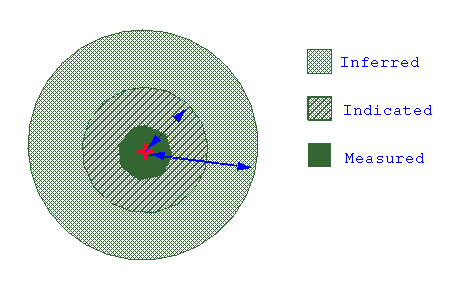
Figure 1: Classifications
To run this option from the command line, type:
