

Flag Samples - Script
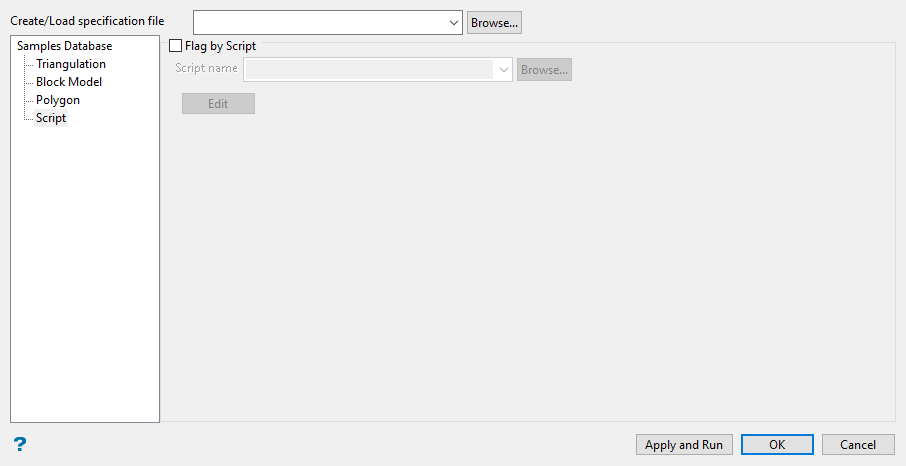
Flag by Script
Select this check box to perform calculations on samples, or to classify samples using a nominated script file (. dcf).
Script name
Select the script file (. dcf) to use. The drop-down list contains all . dcf files found in the current working directory. Click Browse to select a file from another location.
To create a new file, enter the file name and file extension.
Select the Edit button to edit an existing script or, if applicable, generate one through the use of a text editor such as Notepad or WordPad. Refer to Appendix B of the Vulcan Core documentation for a list of operators/functions. Appendix E of the Vulcan Core documentation explains the format of a script file plus any available commands that may be used with the script file.
An example script file for sample calculations is provided below;
if (GEOL:LITH eqs "   TQ1") then    GEOL:
The last statement is a classification, for example
if (GEOL:LITH eqs "   TQ6") then    GEOL:LITH = "   TQ7""
reclassifies the litho field as TQ7 if the Litho field (LITH) equals TQ6.
The other statements perform calculations, for example
if (GEOL:LITH eqs "  TQ1") then    GEOL:
puts 2.87 in the SG field if the Litho field equals TQ1.
Note: The following order will be used when one or more methods have been selected:
1. By Triangulation
2. By Block Model
3. By Polygon
4. By Script
