

Export Data Mine - Design Strings
Use this option to export design string data to a Datamine file. You can also export triangulation data to a Datamine File using the Export Datamine - Triangulation option.
Instructions
On the File menu, click Export to display the Export panel.
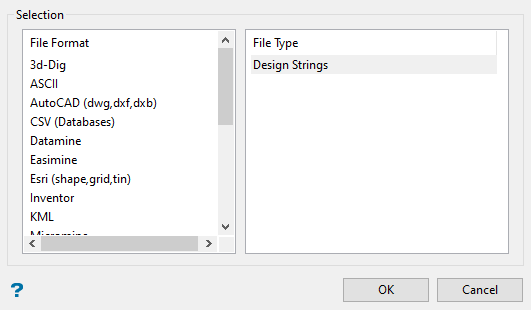
Click Datamine in the File Format column on the left.
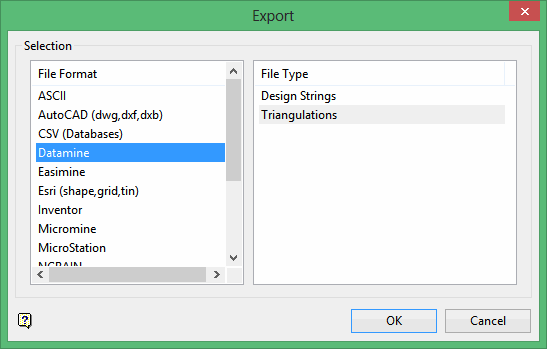
Select Design Strings from the File Type field on the right side of the panel.
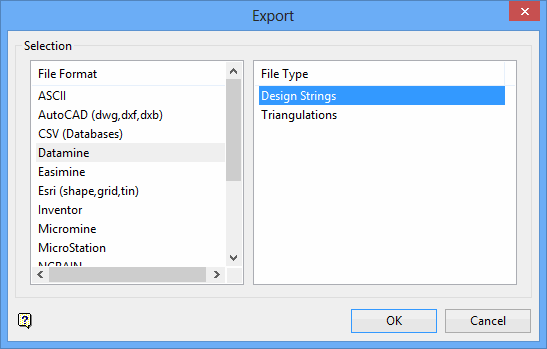
Click OK to display the Export String to Datamine panel.
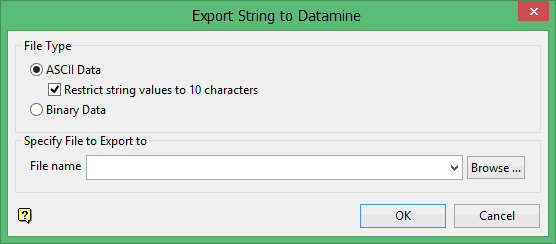
Select ASCII Data or Binary Data to specify the output format for the design string data. If you select ASCII Data, you can select the Restrict string values to 10 characters check box to ensure that the file name is 10 characters or less.
Specify the name of the output file in the File name box. You can create a new file by entering the name in the box or select an existing file from the File name drop-down list. To select a file from another location, click Browse.
Click OK to display the Select By menu.
Select the method by which you want to select the objects and select the object(s) to be exported. Each time you finish selecting objects using a particular method, the Select By menu displays again. You can then select additional objects using other methods, if desired.
Click Cancel on the Select By menu when you are finished selecting objects. The files are then exported and a confirmation message displays.
