

Convert Specifications
Use this option to convert existing Legacy Grade Control specifications into Grade Control Version 2 specifications.
Note: This operation, however, does not always produce the correct conversion results. With the Legacy Grade Control specifications, nothing is explicitly identified and therefore, it is not always possible to determine the purpose of system variables. Moreover, Grade Control Version 2 is more strongly data-type bound. Where Legacy Grade Control allows, for example, strings and numeric data to be concatenated without question (and thereby leading to unnoticed errors), the new Grade Control requires explicit conversion of data to the same type making aware of what is requested in the Assignment Rule. Therefore, a post-conversion manipulation is advised.
Instructions
On the Grade Control menu, point to Setup, then click Convert Specifications to display the following panel.
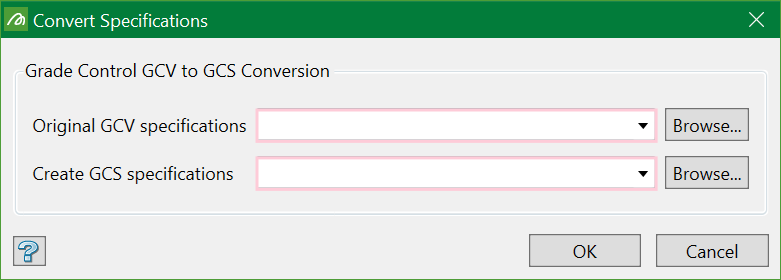
Enter the names of the original specification file and the new converted one. You can either select from the drop-down list or browse from another location.
Press OK to start the conversion. After conversion, any errors found will be displayed.
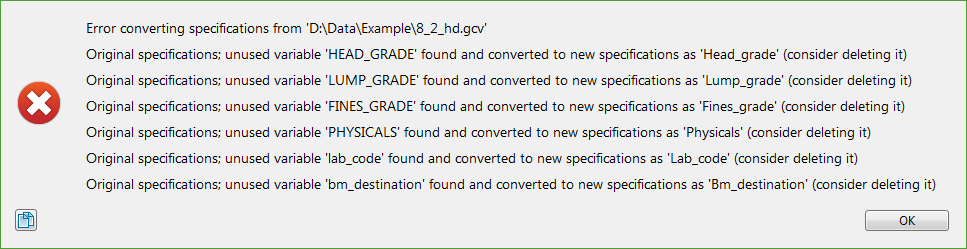
In the example above, the errors don't seem to be severe and therefore won't stop the specs from functioning. A number of data variables have been found that are not being used i.e. they have no assignment rules of their own, are not used in any other variable’s assignment rules, and do not appear to be associated with a database field.
After pressing OK on the error report (if any), a pop-up to load the converted specifications will be prompted.
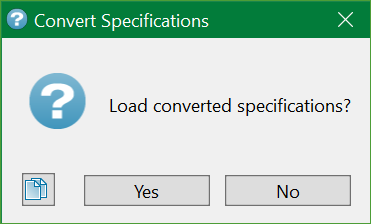
Choose No to complete the conversion process. Choose Yes to allow corrections to be made using these standard setup tools.
As with the standard Load Specifications option, more detailed specification validation checks are run and further errors may be visible.
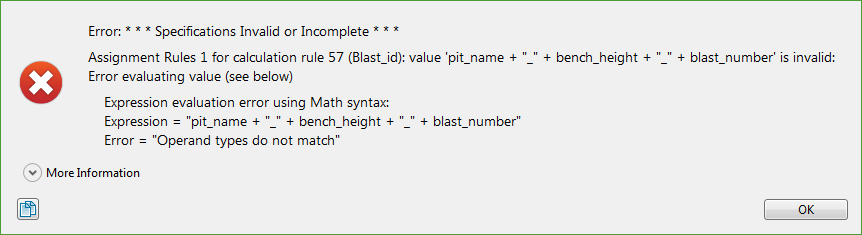
This error illustrates a datatype mismatch where an assignment rule is attempting to concatenate STRING and NUMERIC data. This is discussed in detail in the next section.
Common Conversion Problems
Determining Required System Names
In the Legacy Grade Control specifications, no item is identified explicitly, so some educated guesswork and assumptions have to be made when determining the vague synonym name which applies to a particular system name, particularly the required items. This gets it right most of the time, but sometimes it can go wrong. This can be sorted out by manipulating the Grade Block Name Field.
Grade Block Name Field
For some reason, the grade block name field seems to produce the most mismatches. This field is the relational link between all of the grade block tables. So, it is supposed to be marked as the key in the legacy specifications. But very often it isn’t, as the legacy system could use it without checking this.
If it hasn’t located the key field, it then searches for something called grade_block, gb_name or gb_key as the most common found names in use. If it doesn't find any of these, it simply chooses the first unused string variable. None of these fallback checks is ideal. This is always caught out by the following scenario.
There seems to be a use of creating a ‘grade block name’ by concatenating things like the bin destination with a numeric identifier (often the real grade block key) using an assignment rule. This is not the grade block key, nor can it be (because it cannot be guaranteed to be unique). The grade-block key is given by the grade-block creation process and is guaranteed to be unique within the blast. The problem comes in that this created ‘name’ field is often called gb_name while the actual name is something unrecognised.
In this case, when there is no key marked, the wrong field will assumed to be the key field. This will go through without error but the specs will not work.
The best way to avoid this is to ensure that the correct field used to identify the grade-block at creation is marked as the only key field in the Advanced Tab of the Legacy system.
Data Type Mismatch
This is the most common problem encountered when converting specifications and is not visible until the converted specs are loaded.
This is encountered because the Legacy Grade Control system had no datatype enforcement, but merely converted between the types silently whenever required, which could cause unseen and strange errors, particularly if the data items did not match the DB fields they were intended for.
With new Grade Control V2, the data typing is rigid. Whilst this requires more work, it ensure that you are always aware of what is going on.
The most common place these data-mismatch errors will occur is in the Assignment Rules. One such error occurred in our example conversion above. In this example, there is an assignment rule for an attribute called Blast_id which we can see from the error message:
pit_name + “_” + bench_height + “_” + blast_number
The error message reads Operand types do not match. A guess can be made from their names that bench_height and blast_number are most probably NUMERIC, so pit_name must be STRING if there is a mismatch. Checking the Calculation Rules set up for their datatypes confirms this. So, to correct this concatenation for the STRING variable Blast_id, the NUMERIC variables need to be converted to strings. There are built-in functions for the expression handler used by the Assignment Rules to handle this. Refer to the Appendix to know more.
The corrected statement would be:
pit_name + “_” + as_str(bench_height) + “_” + as_str(blast_number)
This will now perform exactly as it did in Legacy Grade Control, but now explicitly states the intention of the user, rather than applying implied behaviour that may not be expected.
