

Merge toolbar
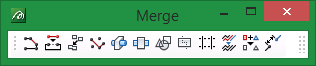
|
Icon |
Tooltip |
Description |
|
|
Join Lines |
Joins two lines. Refer to the Design > Object Edit > Join Lines option for more information. |
|
|
Paste |
Pastes a line into another object. Refer to the Design > Object Edit > Paste option for more information. |
|
|
Merge |
Merges polygons to create new polygons. Refer to the Design > Polygon Edit > Merge option for more information. |
|
|
Merge Points |
Joins points. Refer to the Design > Object Edit > Join Point option for more information. |
|
|
Boolean |
Performs Boolean operations on triangulations. Refer to the Model > Triangle Utility > Boolean option for more information. |
|
|
Polygon Boolean |
Performs Boolean operations on polygons. Refer to the Model > Triangle Utility > Poly Boolean option for more information. |
|
|
Build Polygons |
Creates polygons from intersecting polygons and lines. Refer to the Design > Polygon Edit > Build option for more information. |
|
|
Partition |
Partitions polygons using an interactively digitised partition line. Refer to the Design > Polygon Edit > Partition option for more information. |
|
|
Impose |
Partitions polygons using pre-designed intersecting lines. Refer to the Design > Polygon Edit > Impose option for more information. |
|
|
Coalesce |
Coalesces objects into one object. Refer to the Design > Object Edit > Coalesce option for more information. |
|
|
Unify |
Unifies objects into a nominated layer. Refer to the Design > Layer Edit > Unify option for more information. |
|
|
Link |
Links lines that fall in a specified tolerance. Refer to the Design > Point Edit > Link option for more information. |


