

Type
Use Type to display (types) the value for the current grid cell.
Note: This option assumes that there is a loaded grid. Multiple values may be displayed using the Repeat Count option. However, to use the Repeat Count option you will need to use the Cell option first in order to make a grid cell current.
Instructions
On the Grid Calc menu, point to Grid Query, and then click Type to display the Type panel.
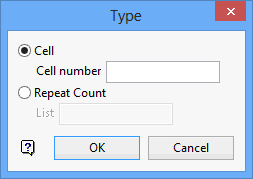
Cell
Enter the cell number for which you want the value displayed in the Report Window.
Repeat Count
Displays a list of points starting at the current point. Enter a value for the list, a negative value will cause the points prior to the current point to be displayed. You must display a cell's value prior to using this option, that is, you can only use the Repeat Count option if you have previously used the Cell option.
Click OK.
