

To Surface
Use this option to relimit a line either a set vertical distance from a surface, or a set distance along a gradient to a surface.
Instructions
On the Design menu, point to Relimit, then click To Surface.
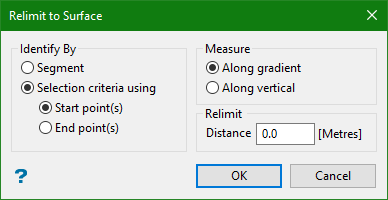
Identify By
Segment
Use this option if you want to select the starting point of each line and complete the operation individually, rather than selecting a group of lines and completing the operation on all the lines at the same time.
Tip: This can be useful if you have multiple lines and the point sequences are not labelled in the same direction.
Selection criteria using
Use this option if you want to select all the lines as a group and complete the operation on all lines at the same time.
Note: If you have multiple lines with the point sequences starting at various ends, this option may have unwanted results.
Start point
Relimited portion of line will be from starting point to the surface.
End point
Relimited portion of line will be from ending point to the surface.
Measure
Along gradient
Select this option to measure the distance between the end of the line and the model is along an extrapolated version of the line.
Along vertical
Select this option to measure the vertical distance between the end of the line and the model
Relimit distance
Select either a grid mesh or triangulation that is onscreen.
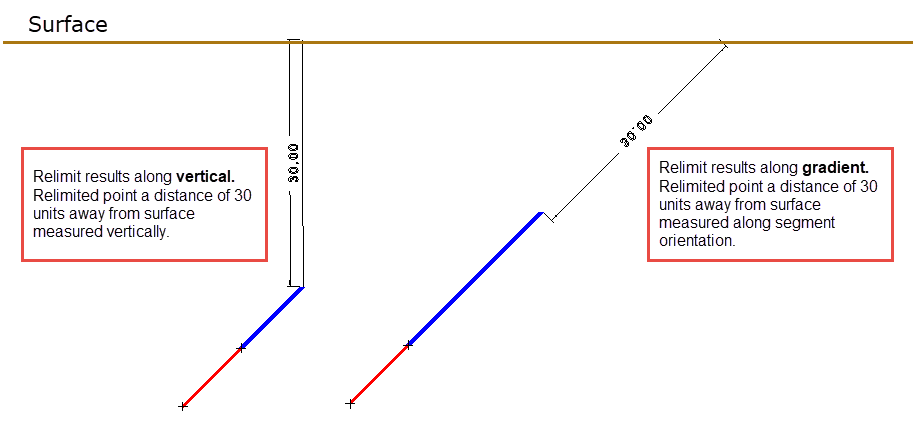
Figure 1: Results shown from using a distance of 30 units for both vertical and gradient examples.
