

Remove From 3D
Remove 3D structural data
The Remove From 3D option to remove the structural data displayed in the Primary Window. To do this, the Remove From 3D option will actually clear the relevant layer.
Instructions
- Select Geotech menu
- Select Display submenu
- Select Remove From 3D option
The following panel displays.
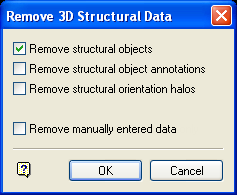
Remove 3D Structural Data panel
Remove structural objects
Select this check box to remove all structural data loaded in the Primary Window.
Remove structural object annotations
Select this check box to remove all structural data annotations from the Primary Window. Annotations are created using the Annotate option (under the Geotech > Analysis submenu).
Remove structural orientation halos
Select this check box to remove all orientation halos from the Primary Window.
Remove manually entered data only
Select this check box to remove manually entered structural data from the Primary Window. Manually entered structural data is data created using the Create or Slope options (under the Geotech > Analysis submenu), or loaded as such through the Load To 3D option.
Note: Removing manually entered data will not affect the rest of the loaded structural data.
Select OK.
