Translucent Factor toolbar
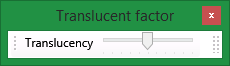
This toolbar is accessed by right-clicking on the Enable Translucency button  on the Graphics toolbar.
|
n.a
|
Translucency
|
Affects the translucency of the display. When the slider is at the left end objects are not translucent. When the slider is at the right end the objects are invisible.
You can apply translucency to multiple triangulations. Simply select the triangulations and use the slider to change the translucency factor. To select all triangulations in a region, drag out a rectangle surrounding part or all of the triangulations. If you drag from top-left to bottom-right, then only objects completely inside the rectangle are selected. However, if you drag from top-right to bottom-left, then all objects that touch the rectangle are included.
|


