

Import MineSight Triangulations (ASCII)
Instructions
On the File menu, click Import, then click MineSight in the File Format column on the left side of the Import panel, and select Triangulations (ASCII) for File Type on the right.
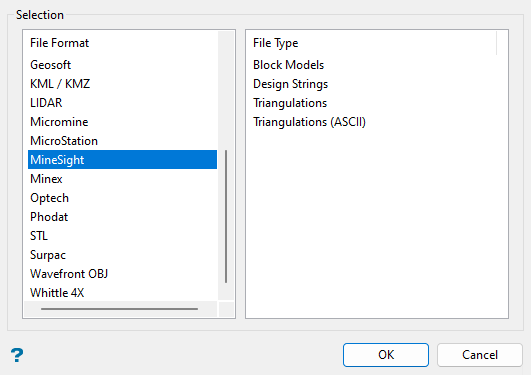
Click OK to open the panel used to import MineSight ASCII triangulation files.
The panel consists of two tabbed sections:
Note: All import triangulations use the default triangulation folder set in preferences, unless you have defined an alternate path.
Selection tab
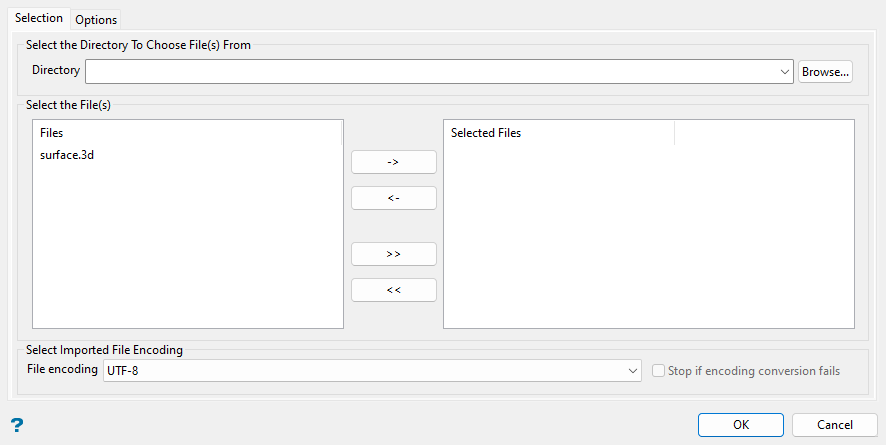
Select the MineSight files (.3d) that you want to import from the current working directory. Select from another folder within the current working directory by using the Directory drop-down list, or click Browse... to select a different location.
To highlight multiple list items at once, use the left mouse option in combination with the Shiftkey (this is for items that are adjacent in the list; for non-adjacent items, use the Ctrlkey and the left mouse option).
Move the items to the selection list on the right side of the panel.
- Click the
 button to move the highlighted items to the selection list on the right.
 - Click the
 button to remove the highlighted items from the selection list on the right.
 - Click the
 button to move all items to the selection list on the right.
 - Click the
 button to remove all items from the selection list on the right.
Select the appropriate File encoding from the drop-down list.
Options tab
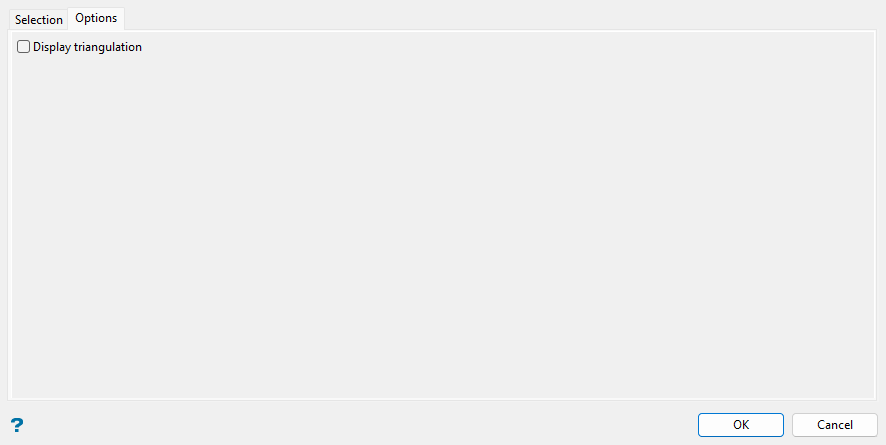
Set the desired triangulation import options in this section.
Select the Display triangulation checkbox to show the imported triangulations on screen after clicking OK.
Note: A new panel will pop up with triangulation display attributes (solid shading, line colour, pattern, translucency, etc.) after clicking OK. See more information for the Model > Triangle Files > Properties option to modify the attributes in this panel. You can also access the display attributes by right-clicking on the triangulation and selecting Properties... from the context menu, or by clicking the  Triangulation Properties button on the Status toolbar.
