

Creating a Variogram from a Block Model
Calculate a semivariogram from block model data.
On the Variography tab, in the Charts group, click Variogram.
When you click Variogram in the ribbon, the Properties panel on the right will populate with various options.

Single Direction
Instructions
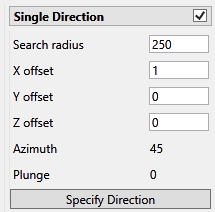
Setting up the parameters for a single direction variogram is a three step process.
-
Enter the Search radius and X, Y, and Z offsets. The offsets do not need to be exact since these may change in the next step.
TipA red border will warn you when an entry is not a number or has an incorrect format.

-
Next, click the Specify Direction button and a panel like the one shown below will be displayed. Use this panel to set the direction parameters. Enter the azimuth and plunge you in which you want to calculate, and the maximum amount of offset you are willing to allow to achieve that direction.
As you input the numbers you will notice the values for the offsets, azimuth, and plunge may change. This is because VDA is calculating how close the variogram can get to the direction you have chosen with the maximum offset you have selected. As you adjust the Max offset, the values for the offsets and/or azimuth and plunge will change. In this way, you can hone in your settings to the desired direction.
-
Click OK when you are satisfied with the results.
Search radius
The search radius should correspond to approximately half of your data field. Past the halfway point the search will over-extend the edge of the data.
X, Y, Z offset
The offset indicates how far from the centroid of the block the search is to begin. A lag of 0 indicates that the search will start at the centroid. A lag of 10 indicates that the search will start 10 units from the centroid, (units being whatever system of measurement you are using. If US, then feet. If International, then metres.)
Azimuth
Enter the azimuth. This parameter controls the azimuth direction in which variography is evaluated.
Plunge
Enter the plunge. This parameter controls the plunge direction in which variography is evaluated.
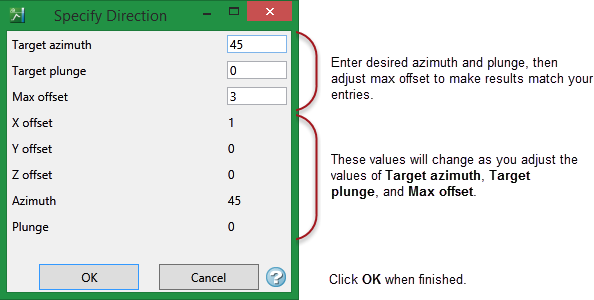
Target azimuth and target plunge
Enter the azimuth and plunge you are aiming for.
Max offset
Enter the amount of tolerance you are willing to include in the lag distance in the attempt to hit the target azimuth and plunge.
