

Display Characteristics
This tool changes the hole display based on contents in the database being used.
Instructions
On the Underground menu, point to Ring Design, then click Display Characteristics.
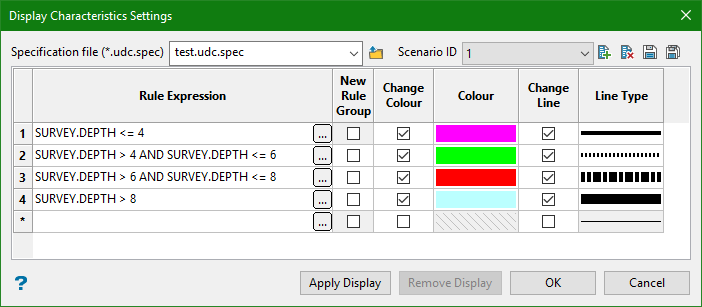
Specification file
Select the specification file to use or enter a new one.
Scenario ID
Enter a short description of the specification file name. This will allow you to save multiple style scenarios using the same basic parameters.
Rule Expression
An expression Builder panel is available by clicking the  button.
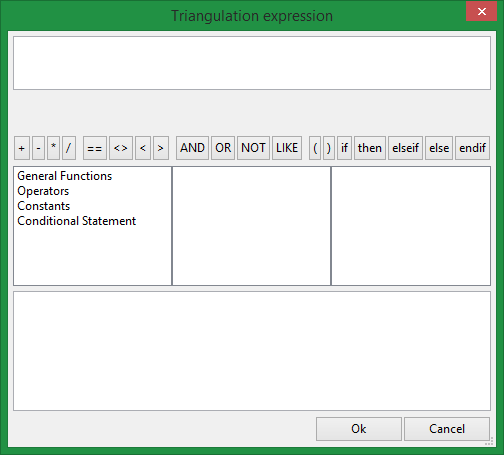
The Expression Builder panel is designed to help the user create an expression by:
-
Listing the available variables, functions and operators, along with their descriptions and examples of use. Double clicking on an item inserts the selected item into the expression
-
Listing the conditional statements that can be used. Double clicking on any of the combinations such as ‘if-then-else-endif’ will insert the statements into the expression ready for the user to enter the conditions and values
-
Checking the syntax of the current expression (the expression is displayed in red when invalid)
-
Various ‘intrinsic’ attributes of the object are available to be used in the expression. A description of each of them is shown in the bottom pane of the panel
New Rule Group
The first rule that is satisfied will be applied until it hits a row that is defined as a start of a New Rule Group.
Change Colour
Select this check box to alter the object's colour when the corresponding field matches a condition.
Colour
Select a colour from the current colour table. This column will be disabled, i.e. unavailable, if the Change Colour check box has not been checked.
Change Line
Select this option if you want the style of the line to change.
Note: If this is selected, you will need to assign a line type.
Line Type
Select the line thickness and style.
Buttons
Apply Display will apply the current definition to the session.
Remove Display will remove any definition that was being applied.
OK will save the specification and exit the panel.
Cancel will exit without saving.
