

Concepts
- Concepts
- Data Concepts
- Analytical Concepts
- Exploration Evaluation and Ore Body Delineation
- Grid Mesh Surfaces
- Triangulations
- Block Modelling
Concepts
Geological modelling and mine design are 3D problems, and Vulcan has long been recognised as the leading 3D software package in the mining industry. Maptek's commitment to a truly 3D mining software package resulted in the development of 'Vulcan', the Vulcan graphical user interface (GUI).
Vulcan displays the required data in true three dimensions, while allowing the user to manipulate and use the data as required. In addition to maintaining 3D integrity, Vulcan also allows for the seamless interaction of many data sources such as ASCII files, design data or data from user defined databases. This means that different data sources are transparent across the user spectrum, permissions permitting. Embedded in Vulcan is context sensitive help, including hyperlinks to 'jump' to required sections or associated chapters!
Depending on the type of body under investigation, the exact methodology will differ, but Vulcan supports all of the industry standard modelling tools including Grid Mesh modelling, Surface Triangulations, 3D Solid Triangulations, and Finite Element Mesh analysis.
Data Concepts
Data input concepts include digitising, ASCII import, data import from other systems (DXF, DATAMINE etc.), data capture into datasheets and the integration of various databases across a network.
Vulcan supports various databases. The most commonly used are:
Graphical or design databases which are based on a point-object-group-feature-layer principle, and contain any graphical data representations such as contour lines, geological sections, reserve polygons etc.
Text based analytical databases such as geological databases, drill hole databases, geotechnical or survey databases, sampling or channel sampling databases. These can be imported in ASCII, columnar or relational format. Vulcan databases are user definable and can be viewed interactively in Vulcan. While maintaining graphical links to the databases, Vulcan also allows the use of links to external data sources such as photographs of core or video clips and sound files. Data import facilities include data validation of various forms. Once the data has been captured all of the tools exist for complex data manipulation and extraction, including the use of the Vulcan 'Database Graphics Language', DGL, and Inquisitor!
Analytical Concepts
Standard statistical modules allow for analysis of the various data forms and databases as well as the fitting of curves and distribution types.
- Data compositing is an important part of the manipulation process and Vulcan caters for various forms of downhole compositing as well as the graphical display of calculated composites. Easy to use tools exist for calculating raw uninterpolated reserves contained in solid models etc. as well as to perform statistical analyses on the composites.
- Standard variography tools allow for the calculation of semi-variograms in multiple directions in a single session, while calculating absolute, semi-variograms can be modelled using various mathematical models, and the 3 dimensional resultant ellipsoidal shape represented graphically next to the raw data and solid models to ensure the directional integrity. The validity of the semi-variograms can be analysed using cross validation techniques and standard statistical tools.
Geostatistical analysis in Vulcan is supported by three commercial products GSLIB (default) from Stanford University, Geostokos (Dr Isobelle Clark) and code from Mining and Resource Technologies (M&RT, Western Australia). The techniques allowed for include cross-validation, kriging, inverse distance methods, ordinary kriging and stochastic simulation. It is worth noting that the code from GSLIB allows for the sharing of the geostatistical load across a network!
Classical statistics concepts include Sichels 'T' estimates, trend surface analysis, least squares regression and curve fitting. Normal, log-normal, and 3 parameter log normal distribution analysis, grade above cut-off analysis and more. All of which can be represented, graphically of course, whether by cumulative log normal plots, tetrahedral plots, scatter diagrams or simple histograms and line plots.
Exploration Evaluation and Ore Body Delineation
Vulcan supports four modelling techniques:
- Grid Mesh Modelling
- Surface Triangulations
- Block Modelling
- Finite Element Mesh Modelling
Each of the above can be applied to the appropriate geological environment or data type being processed.
Grid Mesh Surfaces
This technique is commonly used for tabular or undulating surfaces or horizons. Raw data is used to interpolate the values at a series, of evenly spaced grid nodes. In the Vulcan grid calculator, each node carries four values, x,y,z and w, where the z and w values may be substituted by any available variable. This facility makes the module extremely useful for the visual analysis of structural, geophysical and geochemical data. For a geophysical analysis the topography may be coloured according to the values of an aero-magnetic survey, affording easy evaluation of the effect of the topography on the results. In a geochemical analysis, the 'z' value may be substituted by the gold value, and the resulting "topography" coloured by another variable say arsenic.
If there was a correlation of As and Au, we would expect the gold peaks to be associated with high colours etc. These facilities allow for rapid analysis of an exploration area and easy targeting of areas of interest. Grid node values may be interpolated using inverse distance, kriging, trend surface analyses etc. The grid may be smoothed, masked, faulted and forced to honour the known data points. Grid mesh modelling in Vulcan allows for the use of multiple data sources for data input, including geological design databases and drilling databases. The Vulcan Grid Modeller also caters for the generation of derivative grid such as slope and reflectively analysis, as well as the incorporation of complex matrix calculations.
Triangulations
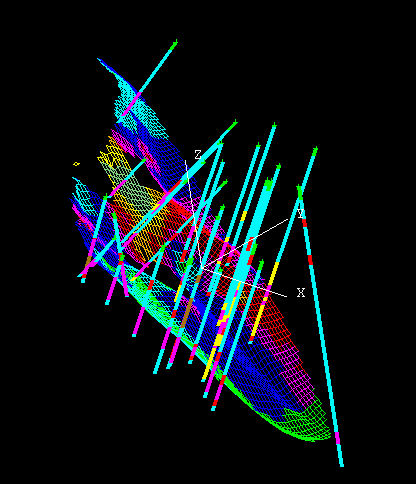
Vulcan supports triangulation modelling in two forms; as surface triangulations or complex 3 dimensional shapes. In addition to polygons, triangulations form the basis of many functions in Vulcan. Triangulations may be used to delineate topography, geological boundaries, pit designs, roads and underground stopes and development. Triangulations are data honouring techniques and can be constructed from various data forms such as points, lines and polygons from various sources. Triangulations may be constructed by converting grids and vice versa.
Vulcan 's triangulation algorithms are recognised as the best on the market. They include mathematically complex modules such as optimum shape honouring, spur string generation and avoiding flat triangle generation. Various forms of triangle editing are also available; these include individual facet and vertex editing.
In ore evaluation, triangles are used, among others, to define rock types, geological zones, select samples and blocks, and define areas of interest or stopes. Various techniques exist for intersecting triangles with analytical data forms.
Block Modelling
By design, all of the geostatistical tools are geared towards modifying block values in an existing block model. The block modelling concepts form the basis of many other downstream applications, although not exclusively so. In Vulcan, block models are entirely user defined and may be designed in any orientation in 3 dimensional space to optimise the model for a particular body (strike, dip and plunge).
Sub-blocking facilities are commonly used to better define lithological boundaries at contacts. The block model can be indexed for rapid response to queries. Each block may contain up to 300 variables and the only limit to the number of blocks per model, is the disk space available. Various default values, such as rock types and pre-estimation grades can be defined during block model generation by making use of triangulations for boundary constraints etc. Vulcan also applies the concept of enforcing blocking priorities so that the value of a common block may be made exclusive by enforcing higher priority values for different boundary constraints. In this manner it is possible to enforce a geological history, so that a dyke 'overprints' an orebody without necessarily defining the contact between the rock type and the dyke!
Block values can be divided into three broad categories:
- Spatial values - XYZ (locality) volume, block 10 etc.
- Geological values - rock type, hardness
- Analytical values - grades, density, dollar and economic values.
Each of the above have their own peculiarities. In Vulcan, all of the tools are provided for the flexible manipulation of these variables. They include: manual manipulation by picking blocks in graphical mode, conditional calculation, geostatistical interpolation/extrapolation techniques and the ability to perform calculations in script form, including the use of " if and elseif " statements.
While the block modelling tools in Vulcan are extensive, Maptek does support import and export facilities, allowing interaction between other estimation systems (for example, Geovariance) and optimisation programs such as Whittle. In addition to import and export facilities, comprehensive reblocking facilities, including the use of scripts, can be used.
Once the block variables have their respective values, they may be viewed in many different ways, sliced sectioned and colour coded in any orientation. Blocks may be viewed as cubes, points, squares etc. after selection criteria have been applied. The block model may be contoured according to grades, rock types, economical or other variables.
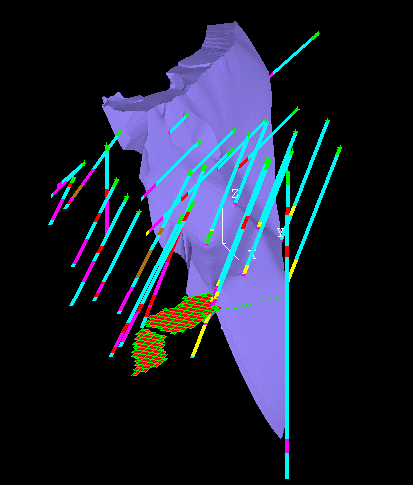
Resource calculations can be carried out on sections, polygons or solids. The results are inherently inferior to those produced in the reserve calculations, but do afford "quick and dirty" calculations.
Vulcan has two levels of reserve calculation: one for single solid type calculations where the reserve for a single body (triangulation,polygon) is reported. This type of report supports up to six independent variables and 10 cut off values. A more complex reserve calculation can be achieved using block reserves advanced, where the user may set up a report sheet, with user defined variables and columns. This format also allows the use of generic columns, calculated on output if required.
Statistics on individual block variables is also easily achieved in the standard statistics module, where the outcome of two independent OK runs may be compared to each other to determine over estimation, or the distribution of the block values estimated etc.
