

Inquisitor
Record Statement
This is the fundamental statement type in the Inquisitor script, and provides the main database querying facility. Most of the constructs used in this language will be familiar to anyone with a little programming knowledge, however, the RECORD_STATEMENT will need some explanation.
The RECORD_STATEMENT is used to set a record variable, and in order to pass through this statement to the code beyond, a test has to be passed. As explained in the syntax table, the syntax of the statement is:
RECORD_ID := RECORD_NAME LOG_EXPR [|]
where:
RECORD_ID = the internal program variable name for the records that pass the test;
RECORD_NAME = the database record type name;
LOG_EXPR = a logical expression (the test which has to be passed in order for logic flow to pass through this statement);
| = an optional modifier to the statement. If this is placed at the end of the statement, logic flow will pass through, even if the test is failed.
Consider this construct in terms of the simple, but familiar, drill-hole database example used in the Introduction section. In the example, there is a relationship group consisting of a header record, a logger record, and a number of lithology records, which may have associated assay records. The following table contains a possible structure for the example database.
| Record Type | Database Record Name | Associated Fields | Field Description and Type |
| Header | HOLEID | BHNAME EAST NORTH COLLAR TOTDEP |
Hole name (STRING) Easting (FLOAT) Northing (FLOAT) Collar level (FLOAT) Total depth (FLOAT) |
| Logger | LOGGER | NAME DATE |
Geologist name (STRING) Date logged (STRING) |
| Lithology | LITHO | TOP BASE ROCK SAMPID |
Depth to top of section (FLOAT) Depth to base of section (FLOAT) Rock type (STRING) Sample ID: link to ASSAY (STRING) |
| Assay | ASSAY | SAMPID GOLD COPPER |
Sample ID:link to LITHO (STRING) Gold assay value (FLOAT) Copper assay value (FLOAT) |
Table 2 - Database Structure Example
Now consider using a RECORD_STATEMENT to list all of the drill-holes starting with ‘DH’. Below is a simple script that will do this:
QL_QUERY:
$FRED := HOLEID: (BHNAME == 'DH*')
PRINT $FRED:BHNAME'
Note: that only the QUERY, and the syntax for the start of the QUERY, section are needed. The RECORD_STATEMENT will pass through for each relationship group that has a Header Record (type HOLEID) in which the Hole Name (field BHNAME) is set to ‘DH*’ (the * is a wildcard meaning any string match - see the section on logical expressions in the Expressions section of this document). If the test is passed, then logic flow passes through and the PRINT statement is executed (more about the syntax of this later). If the test fails, then the next record of the same type will be tested in the relationship group. In this case there is only one of this type (because it is a header) so the next relationship group will be tried (the database structure is checked for numbers of each record type expected in each group so that speed is maintained).
Note: from this example the way the statement is written:
$FRED = the variable name that contains the record selected. This must start with a $ to signify a record variable, but the name FRED is entirely your choice; := is the assignment operator; HOLEID: = the name of the record type being queried (note the : following the name); (BHNAME == ‘DH*’) = the test which has to be passed in order for logic to flow through the statement. In this case, the syntax is to test a field (BHNAME) of the record in question, but any logical expression could be used, even something as simple as (1==1), which would always be true.
Let's examine the recursive nature of the RECORD_STATEMENT in a bit more detail. For example, to query the same database in order to get the thickness of every Lithology section logged as ‘Andesite’ by geologist ‘Mike Smith’ in holes named ‘DH*’, the query would be:
QL_QUERY:
$HOLE  := HOLEID: (BHNAME == 'DH*')
$GEO   := LOGGER: (NAME == 'Mike Smith')
$ROCKS := LITHO:  (ROCK == 'Andesite')
PRINT $HOLE:BHNAME%-10s $ROCKS:ROCK%-20s 'Thickness = '
    ($ROCKS:BASE - $ROCKS:TOP)%10.2f
In this example, each selected relationship group will be tested in the following way. The hole name will be tested to see if it starts with a ‘DH’ if this test is passed, then the logic will flow to the next statement. The next statement will check for the geologist's name, if this is passed, then the logic will drop through to the lithology test. If it fails, then there will be a search for another LOGGER record, as there won't be one, it will look for another HOLEID record (again there won't be one). For the lithology test, each lithology record in the group will be tested if it passes, then the logic will fall through and the print will be done, otherwise it won’t print for that litho record. In flowchart terms the logic flow will be as follows:
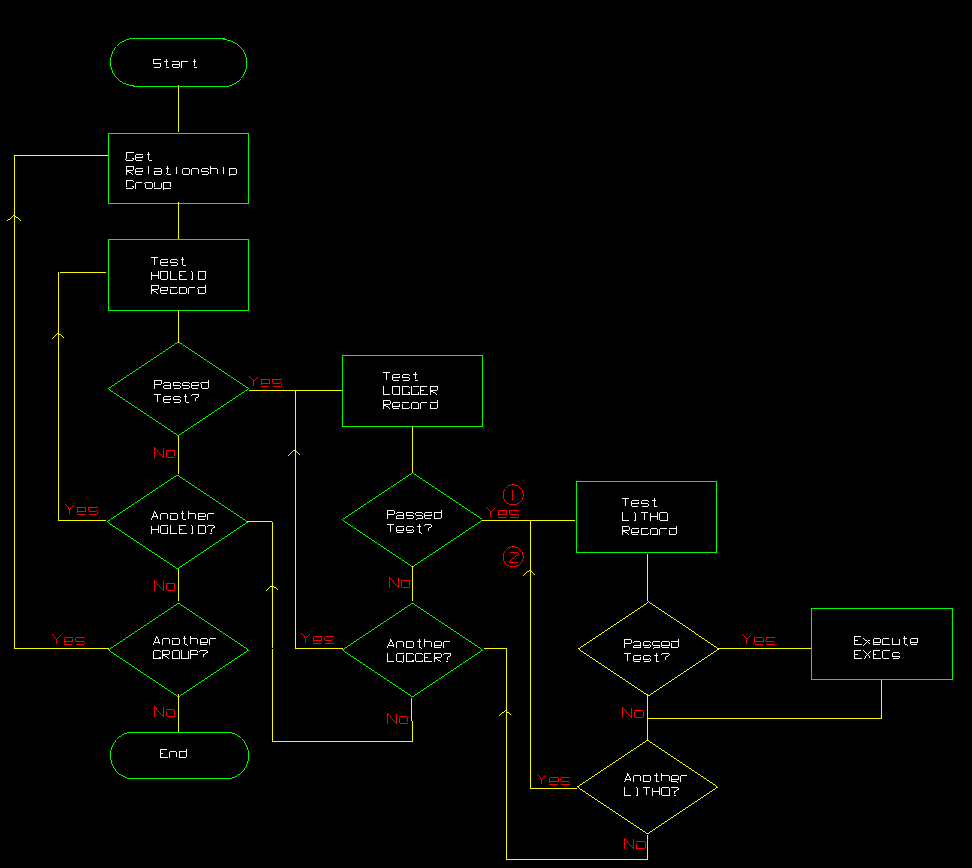
Figure 1: Relationship Group Logic Flow
In the example database there will, of course, only be one HOLEID and one LOGGER record per group, but the logic diagram illustrates the way RECORD_STATEMENT control works. To keep the picture as simple as possible, the boxes labelled 'Test ------ Record' should be considered to read 'Get record' as well as 'Test'. The first time they are entered, the first record of that type will be read, after that the next record will be read. For example, consider the LITHO record test; when logic flow enters from the direction labelled (1) the first lithology record is tested, from then on when logic flow enters from the direction labelled (2) the subsequent lithology records are tested. If logic flow were then to re-enter from (1), that is, if there were a second LOGGER record, the first lithology record would be used again.
This can be illustrated better by considering a real example where the logic would be likely to enter from the equivalent of direction (1) several times during the querying of one relationship group. Using the example database structure, the following script could be written to report the Gold assay values of all of the assay records for every Porphyry section of each hole.
QL_QUERY:
$HOLE       := HOLEID: (BHNAME == '*')
$ROCK_SECT  := LITHO:  (ROCK == 'Porphyry ')
$PORP_ASSAY := ASSAY:  (SAMPID == $ROCK_SECT:SAMPID)
PRINT $HOLE:BHNAME%-10s $ROCK_SECT:ROCK%-10s
    $ROCK_SECT:BASE%7.2f $ROCK_SECT:SAMPID%7s
    ' Gold =' $PORP_ASSAY:GOLD%5.2f
This example also shows how to use Inquisitor to exploit the relational nature of the data. The following table explains the above example in more detail.
|
|
This is necessary syntax to specify this as the QUERY section of the script (the only compulsory section. |
$HOLE := HOLEID: (BHNAME =='*') |
For the logic of the query, this line is not strictly necessary, because every hole will be selected because of the use of the wildcard '*'. However, it is necessary for the report format chosen, so that we can print out the hole name. This line sets the record variable $HOLE to be set to a HOLEID type record if the field BHNAME matches the ‘*’. |
$ROCK_SECT := LITHO: (ROCK == 'Porphyry') |
This line will scan all of the LITHO type records in the hole in order to set the $ROCK_SECT record variable. Each time the ROCK field matches 'Porphyry', the logic will fall through to the next line. |
$PORP_ASSAY := ASSAY: (SAMPID == $ROCK_SECT:SAMPID) |
This line will scan all of the ASSAY type records in the hole in order set the $PORP_ASSAY record variable. Each time the SAMPID field matches the SAMPID field in the current $ROCK_SECT record variable, the logic will fall through to the next line. |
PRINT $HOLE:BHNAME%-10s $ROCK_SECT:ROCK%-10s
    $ROCK_SECT:BASE%7.2f $ROCK_SECT:SAMPID%7s
    ' Gold =' $PORP_ASSAY:GOLD%5.2f
|
This line is the EXEC section of the script and prints out one line of values; the hole name (from the current $HOLE record variable), the rock type (from the current $ROCK_SECT variable), but which will always be Porphyry in this case, the assay sample id from the current $ROCK_SECT variable), the depth to base of the sample (from the current $ROCK_SECT variable), and the gold value (from the current $PORP_ASSAY variable). See the Exec Statements section for a detailed description of the PRINT statement. |
Table 3 - Query
In flowchart form, the logic flow of this script would be expressed in exactly the same way as in the Diagram 3, but for LOGGER read LITHO and for LITHO read ASSAY.
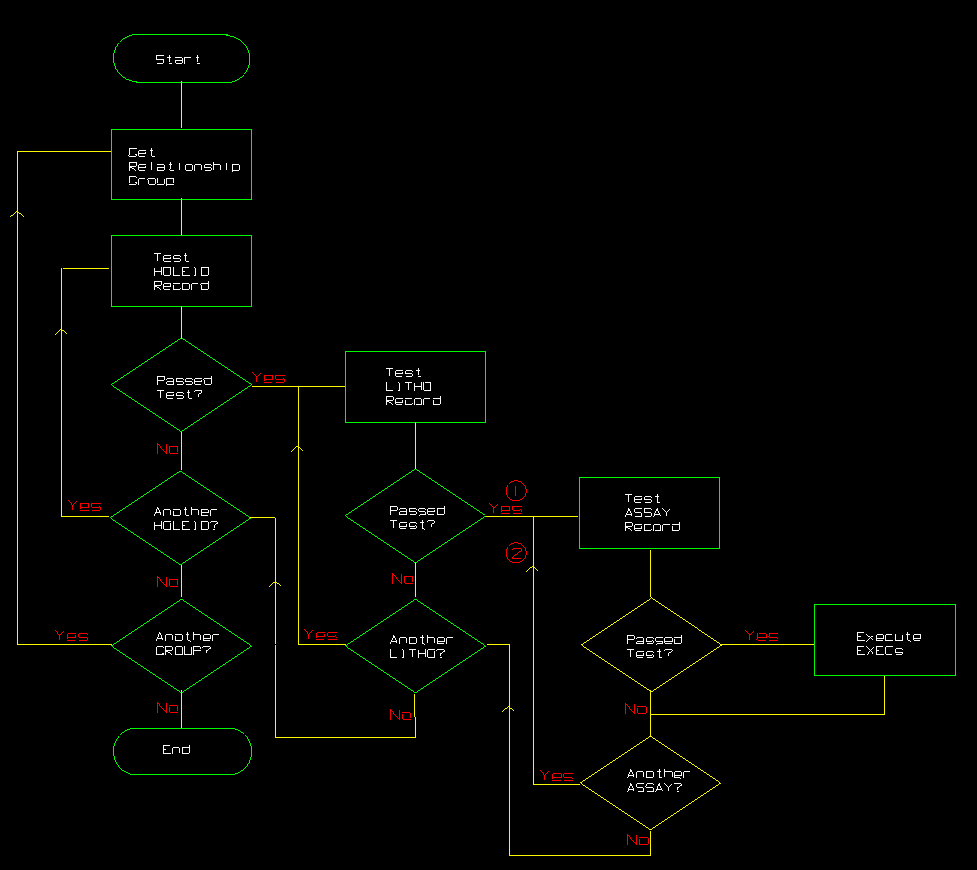
Figure 2: Relationship Group Logic Flow
The effect of this Inquisitor script would be that for each hole, a line of information would be printed for every assay record that is associated with each lithology record in which the rock type is Porphyry. For example,
DH001     Porphyry   101.23 SAMP01 Gold =  0.02
DH001     Porphyry   101.23 SAMP02 Gold =  0.03
DH001     Porphyry   103.75 SAMP21 Gold =  0.07
DH001     Porphyry   103.75 SAMP22 Gold =  0.09
DH001     Porphyry   204.29 SAMP61 Gold =  0.18
DH001     Porphyry   210.36 SAMP72 Gold =  0.21
DH002     Porphyry    98.12 SAMP16 Gold =  0.05
DH002     Porphyry   106.09 SAMP34 Gold =  0.08
  .          .          .      .     .      .
  .          .          .      .     .      .
There are two control options to consider:
- | (Alternative Conjunction)
From the syntax description of the record statement, you can see that there is an optional | that can be added at the end of the statement. This is referred to as the ALTERNATIVE CONJUNCTION, and the construct is used if logic flow is required to go past a record statement even when the logical expression fails. This may at first seem like a strange thing to want to do, but consider the situation where you always want the GROUP section of the script to be executed. In order for this to happen, there must have been at least one successful pass through to the end of the QUERY section. Hence, the alternative conjunction. - QL_OUTPUT_ALL_MATCHES LOG_EXPR (Limit Search)
From the above discussion, and the examples given, you can see that the recursive nature of the RECORD_STATEMENT will cause continued searching until all possibilities of matches are exhausted. Where the data sheet description indicates that there can be no more matches, because of restrictions in the number of a particular record type, Inquisitor is intelligent enough to stop searching. However, this sort of information may not be available in the data sheet description of a particular type of database. If your knowledge of the data is such that you know that after the first match that further searching is futile, or that you are only interested in one match, then there is a control statement that can be used to limit searching to just one match. Its syntax is as follows:QL_OUTPUT_ALL_MATCHES LOG_EXPR
The default state is.TRUE. so that all matches are output. Issuing the CONTROL_STATEMENT QL_OUTPUT_ALL_MATCHES.FALSE. will mean that following the flow of logic through this statement will cause all queries to terminate after the first successful match (or first successful pass through the query if the alternative conjunction is used).
This control can be used as many times as needed in the STATEMENT part of the code to turn the effect on or off as required. For example,
- it could be set as desired just once in the INITIALIZATION section
- it could be set selectively by an if statement in a QUERY section
- it might be turned on at the start of the QUERY section (so that it is set on for each relationship group) but may be set off under specific circumstances in the query (see the Control Statements section).
