

Load
Use the Load option to load an existing symbol for editing. The symbol will be placed in a working layer called 'SYMB_EDT', which can be deleted like any other design layer.
An alternative method of loading a symbol, is to use the Select option, which is accessed by expanding the symbols.dgd.isis file in the Vulcan Explorer application (Resources tab), and then right-clicking on the required symbol.
Instructions
On the File menu, point to Symbols, and then click Load to display the Load Symbol panel.
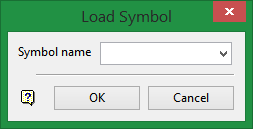
Symbol name
Enter, or select from the drop-down list, the name of the symbol. The drop-down list contains all of the symbols found in the symbols.dgd.isis file.
Click OK.
The chosen symbol displays in the temporary layer (the name of this layer displays in the Status toolbar) and you can start modifying the symbol using options under the Design > Create submenu. Use the Grid Snap  mode when indicating points to ensure precise design work.
Use the Save or Save As options to save the modified symbol.
