

Project
Use the Project option to project a string up a defined number of benches. All projection parameters are used as defined in the specification.
Note The Projection default is up and out. If you want to project any other way, you must make the selection using the Projection Method menu item.Instructions
Click the X hotkey,
or
On the Utilities menu, click Project to display the Project panel.
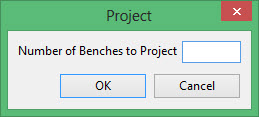
Enter the number of benches you want to project.
Click OK.
Related topics
- New Component
- Projection Method
- Create Polygon
- Insert Ramp
- Insert Switchback
- Flag Ramp
- Project
- Polygon Offset
- Replace String
- Move Point
- Delete Point
- Delete Polygon
- Delete Multiple Polygons
- Join Components
- Intersect Components
- Clip Phases
- Clip Components
- Generate Reserves
- Next Bench
- Previous Bench
- Measure Distance
- Measure Angle
- Reacquire Attributes
- Properties Window
Related tutorials
Was this page helpful?
