

Rename User Station
Edit the name of an existing User Survey Station in the ‘User Stations Layer’. This panel will remember the settings from the last time the tool was run.
Instructions
On the Face Mapper menu, point to Mapping, then click Rename User Station.
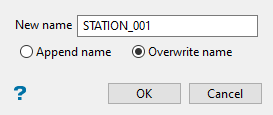
New name
The name to be applied to the selected User Survey Station.
Select from screen the User Survey Station to rename. Enter the desired name to apply to the station. In the previous example of a User Station with the name ‘45_USER_001’, the ‘New name’ settings in the above panel would rename the station to ‘LASER_01’.
Was this page helpful?
