

Export ASCII (Minex)
Use the Export ASCII (Minex) option to export information from Minex to an ASCII file.
Instructions
On the File menu, click Export to display the Export panel.
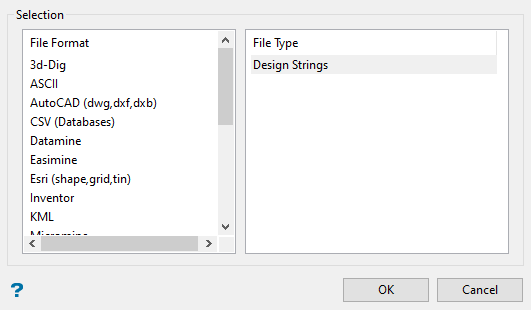
Click ASCII in the File Format column on the left.
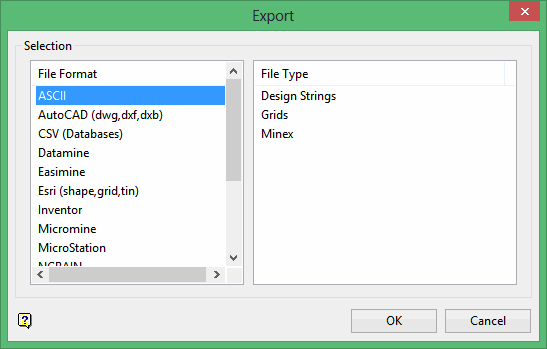
Select Minex from the File Type field on the right side of the panel.
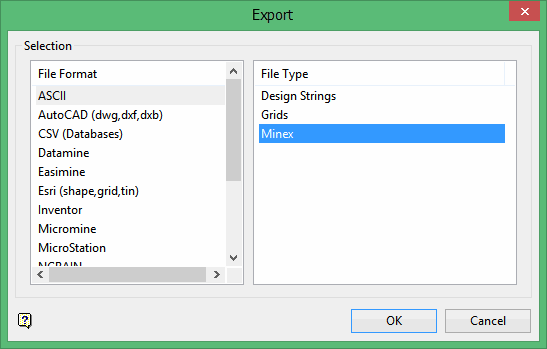
Click OK to display the Export Minex to ASCII panel.
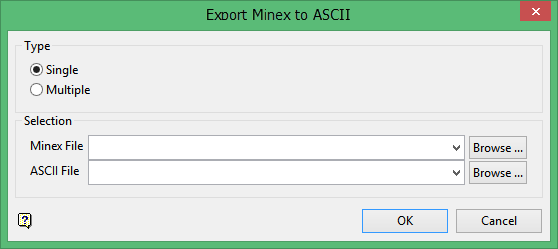
Type
Specify whether you want to export a single Minex fiel or multiple Minex files.
Select Single to export a single Minex file. Use this option specify the name for the resulting ASCII file.
Select Multiple to export multiple Minex files. The resulting ASCII files will inherit the names of the original Minex files. You cannot specify the name for the resulting ASCII files if you select the Multiple option.
Note: The Selection area of the panel will change according to which type you choose.
To export a single Minex file:
Minex File
Select the Minex file (.dmp) to export from the Minex File drop-down list, or click Browse to select a file from a location other than your working directory.
ASCII File
Select the ASCII file (.asc) to export from the drop-down list, or click Browse to select a file from another location.
To export multiple Minex files:
Select the directory to choose file(s) from
Select the directory that contains the Minex files (.dmp) that you want to export from Directory drop-down list, or click Browse to select a directory other than your working directory.
Select the file(s)
The available Minex files displays in the Files column on the left.
Select the Minex files that you want to export.
-
Click the -> button to move the highlighted file(s) to the selection list on the right.
-
Click the >> button to move all files to the selection list.
-
To highlight multiple files that are adjacent in the list, hold down the Shift key while you click on the first and last file names in the list.
-
To highlight multiple non-adjacent files, hold down the Ctrl key while you click on the file names.
-
To remove files from the selection list, highlight the file name(s) and click the < button or click the << button to remove all files from the selection list.
Click OK to export the information to the ASCII file(s).
Result
The Minex files are exported to ASCII formatted files. The resulting files will be space-separated XYZ ASCII files. Each string will be separated by a blank line. The resulting ASCII file will be placed in your current working directory.
