

Horizons and Masking
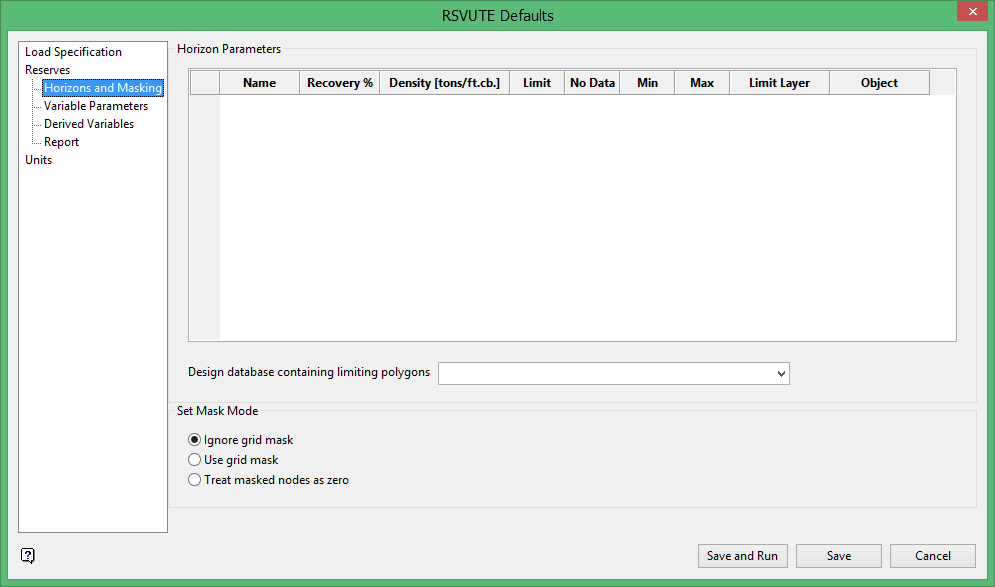
Horizon Parameters
The Horizon Parameters option set the recovery percentage, density, mask and limiting polygons for each horizon. Rsvute recognises four types of "standard" limiting polygons, all generated in Grid Calc:
|
Type |
Description |
Name |
Grid Calc Option |
|---|---|---|---|
|
Limit |
Define the edge of the active gridding region and run through the drillholes at the perimeter of the grid area. |
LIMIT$n |
Generated automatically when a grid is saved and a design database is open. |
|
No Data |
Used around drillholes that do not contain a seam. |
NODATA$n |
Define Method (No coal mask) |
|
Less Than |
Used to mask grid values less than a specified value. |
LT$n |
Define Field (Range mask) |
|
Greater Than |
Used to mask grid values greater than a specified value. |
GT$n |
Define Method (Range mask) |
The No Data, Less Than and Greater Than polygons can also be generated through the Create Polygon Limits option (under the Grid Calc > Contour and Limit Generation submenu).
The standard limiting polygons are usually ignored if you manually created reserving limits (using an extrapolation distance and your knowledge of the deposit). In those cases, you can associate your previously created (non-standard) polygons with each horizon. The non-standard polygons are referred to as "Other polygons".
Name
The horizons are derived from the <proj>.gdc_glob file and cannot be overwritten. These are listed in the first column.
Recovery
Enter, as a percent, the recovery. This value is used to convert the in situ volume and tonnage to a recoverable volume and tonnage.
Density
Enter the density. The density is specified as tonnage units per volume unit, for example tonnes per cubic foot or tonnes per cubic metre. Units depend on the coordinate system of the project (set in the .dg1 file).
Limit, No Data, Less than, Greater than
This section is generally left blank. It refers to the user defined layers containing the limit polygons. These layers must be in the same design database as the standard polygons to use both types. wildcards may be used when specifying these non-standard polygons, allowing similarly named layers to be accessed during the reserving process.
For example, <seam>*_lim = <seam>ash_lim, <seam>btu_lim and <seam>depth_lim.
Mask polygons should only be used by design not by default. Limit polygons picked from the screen are contained in user defined layers.
Note: When specifying Mask Polygons in this panel, you must keep in mind the effect the limits have on the reserving process. The Horizon Parameter option unions (or'ed) non-standard polygons in the same layer. If a wildcard is used and multiple layers are applied, then the non-standard polygons are intersected (and 'ed) and each polygon acts as a new limit. All variables are limited by these polygons. This results in reserves only being reported in the remaining active area.
Set the Mask Mode
Use the Set Mask Mode option to specify how a reserves area is to be restricted. This may be either via grid masks or via limit lines. The latter is the preferred way of limiting seam extents as grid masks are less accurate and tend to underestimate the reserves.
To run this option from the command line, type:
SET_MASK_MODE /option
You must choose one of IGNORE_GRID_MASK, USE_GRID_MASK or TREAT_MASKED_MODES_AS_ZERO. See below for definitions of the mask modes.
For example SET_MASK_MODE /IGNORE_GRID_MASK.
Ignore Grid Mask
Select this option to ignore the grid mask and use all node values instead. This option should be selected when using limit lines. The limit lines are stored in the open design database.
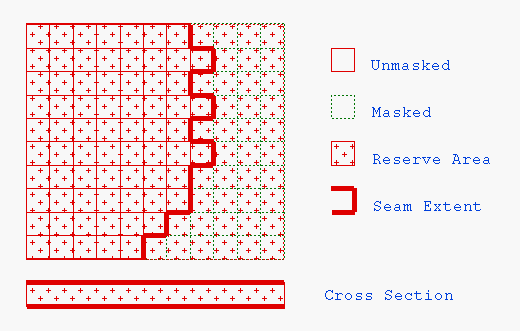
Figure 1: Ignore Grid Mask
Use Grid Mask
Select this option to consider masked nodes as being outside the horizon limit. The mask on each grid used in the report is inspected - structure grids, volumetric grids and quality grids. If any of these grids has a masked node, then that node is excluded from that horizon. All grids must have the correct masks.
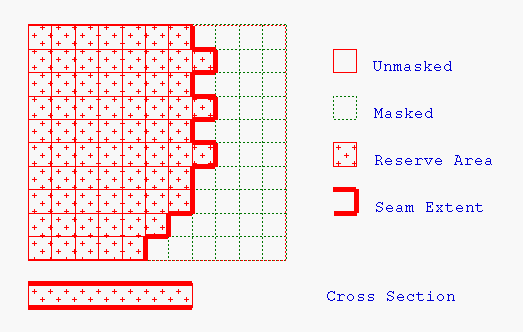
Figure 2: Use Grid Mask
Treat Masked Nodes As Zero
Select this option to set the value of a masked node as zero. As this does not reduce the reserve area, it should be used in those cases where reserves are required beyond the seam (horizon) extent, for example if burden values are required beyond the edge of the deposit.
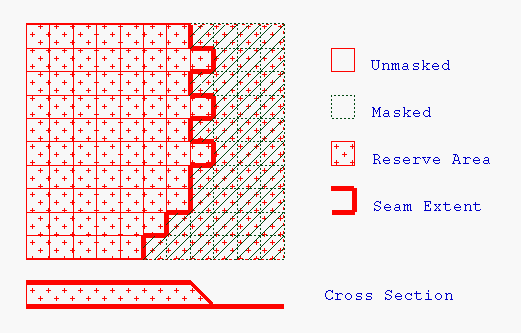
Figure 3: Treat Masked Nodes as Zero
