

Save
The exported surfaces can be saved into triangulations or grids.
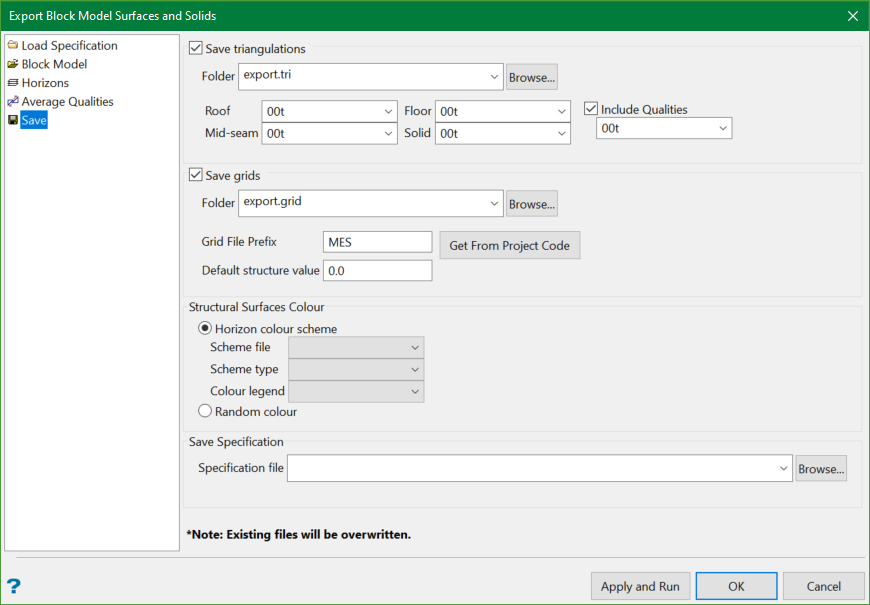
Save triangulations
Select the Save triangulations check box to save the surfaces to triangulation files.
Select a folder for the triangulations. The folder name extension should be .tri. This will ensure that it will be listed in the Vulcan explorer.
If the folder field is left blank, the triangulations will be saved in the current project folder.
Note: Any existing triangulation files will be overwritten.
The default triangulations file extensions are set to .00t for solids and all structural surfaces—roof, floor, and mid-seam. The default quality triangulations file extensions are also set to .00t. However, it is optional whether you want to include quality triangulations in your output or not. Other relevant extensions are provided in the drop-down list.
Save grids
Select the Save grids check box to save the surfaces to grids files.
Select a folder for the grids. The folder name extension should be .grid. This will ensure that it will be listed in the Vulcan explorer.
If the folder field is left blank, the grids will be saved in the current project folder.
Note: Any existing grid files will be overwritten.
The grid file names optionally include a prefix. If a prefix is required, click the Get From Project Code to populate the Grid File Prefix edit box with the current project code, or type in a different prefix in the edit field. By default, the grid file prefix is GEO.
Structural Colour Surfaces
The output triangulations can be coloured using two options: Horizontal colour scheme and Random colour. This is valid for both structural and quality surfaces.
The Horizontal colour scheme involves selection of scheme file, type of scheme, and a specific colour legend. The surfaces exported from blocks marked by a particular seam will be applied the legend colour matching that seam name.
You can also apply system-assigned colours to the output triangulations using Random colour option.
Save Specification
Enter the name and the location to save the .bmsurface_spec specification file.
