

Polygons
This topic includes information about the Polygons branch of the Implicit Modelling Editor.
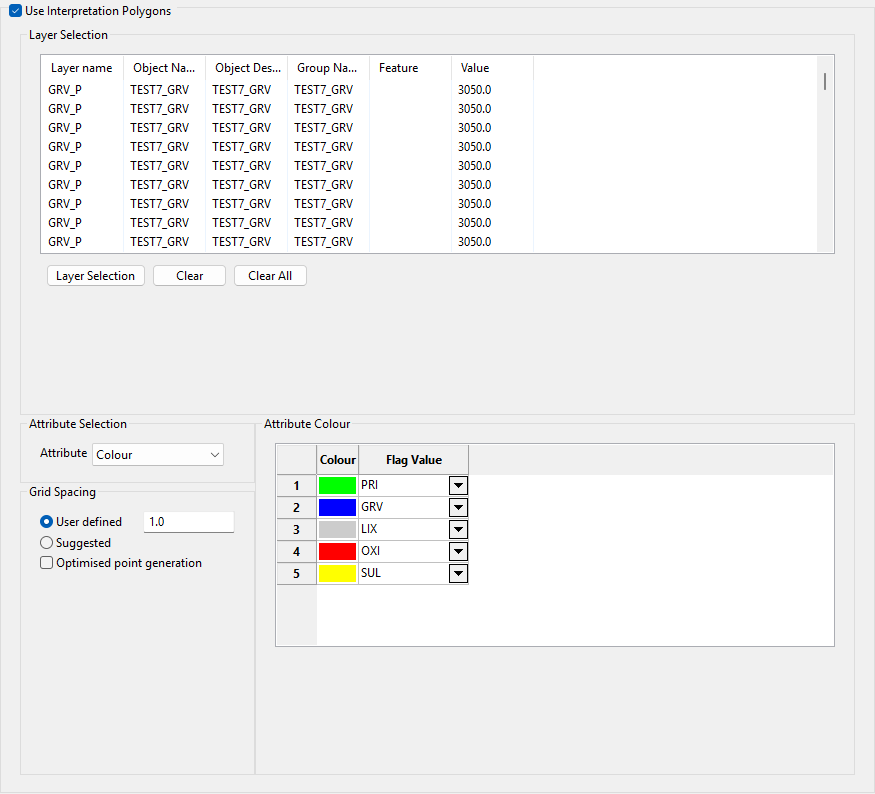
Use Interpolation Polygons
Select the Use Interpretation Polygons check box to use your polygonal interpretations of the domains. These polygons will be used to indicate that you want to enforce the domains described by your polygons. The link between each polygon and the domain can be done using any of the object attributes listed in the Attribute drop-down list. For example, if you select Colour, then the polygon's colour should be defined so that you can assign the domain based on the colour of the polygon.
Layer Selection
Click Layer Selection to display the Select By menu. Choose the selection method and select the items. Click Cancel or right-click to return to the Implicit Modelling Editor panel.
The selected objects and their attributes are displayed in the Layer Selection list. If you want to remove an item from the list, highlight the item and click Clear. To remove all items from the list, click Clear All.
Attribute Selection
Attribute
Select an attribute from the Attribute drop-down list. You can select colour, name, value, group, feature, or layer name.
Flag Value
Select the flag value for the attribute from the Flag Value drop-down list. The list contains all rock types in the selected model parameters file.
Grid Spacing
Select a grid spacing type by selecting User defined and entering a value or selecting Suggested.
Optimised point generation
Select the Optimised point generation check box to optimise point generation by decreasing the number of points.
