

Variable Parameters
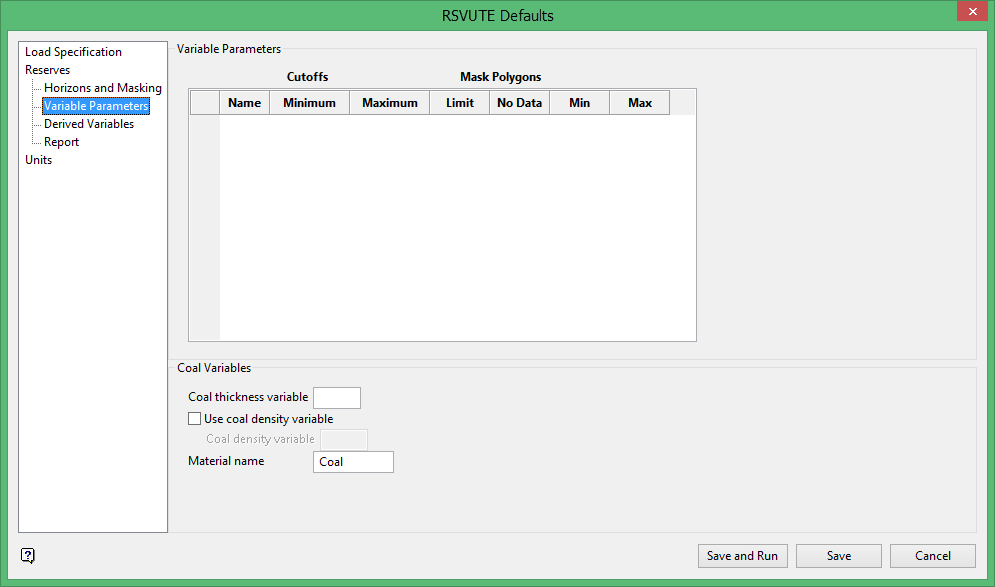
Variable Parameters
Use the Variable Parameters option to set the minimum and maximum cut-offs and the standard limit polygons to be applied to each type of grid used in the reserving process.
The standard limit polygons for a horizon/variable are ignored if they are disabled at either the horizon or variable level, i.e. they must be enabled at both the horizon and variable level before they are used.
For each variable (grid) you may nominate which parameters should be used in limiting the reserving area. In addition to the polygon limits (described in Horizon Parameters), you may also specify minimum and maximum cutoffs for each variable, therefore further limiting the horizon to the area where all the variables fall in their cutoffs. The cutoffs do not effect burden calculations.
Note: Reserves calculated with cut-offs are determined to the nearest grid cell, they will therefore be slightly underestimated.
Cut offs
Enter the minimum and maximum values allowed for each variable.
Mask Polygons
This section is generally left blank (i.e. check boxes are not ticked). The Limit, No Data, Min and Max columns refer to polygons generated by Grid Calc, for example the limit polygon is created when a grid is saved (see also the introduction paragraph). Mask polygons should only be used by design NOT by default.
Coal Variables
Use the Coal Variables option to specify the variable that defines the modelled coal thickness. Typically, the variable is either TK, SR or RM (mine model - run of mine thickness). This option also allows you to specify a density grid instead of a default density constant and the reported material name.
Coal Thickness Variable
Enter the variable to be used to model the coal thickness, that is the first two characters from the file extension (suffix) of the coal thickness grid, for example TK (default - Coal Thickness), ST (Structure Thickness) or RM (ROM Thickness - mine models). All non-standard variables must be setup in Grid Calc prior to running reserves.
Use Coal Density Variable
Select this check box to use modelled densities instead of the default density constant (there are two constants: the global constant set with the Density option and the horizon-by-horizon constants set with the Horizon Parameters option).
Coal Density Variable
Enter the variable to be used to model the coal density, that is the first two characters from the file extension (suffix) of the coal density grid, for example RD or 'DN'.
Material Name
Enter the material name. This defines the name that appears on the reserves report. The default is Coal. The maximum size of the name is 7 alphanumeric characters.
The model will be redisplayed in the Report Window. If a horizon does not have the required modelled coal thickness or density, then the model will have a . instead of the missing variable and the defaults are used. This is TK in the case of coal thickness and the default density constant in the case of density.
