

Shadow By Feature 
Shadow a Feature Object
Use the Shadow By Feature option to shadow all objects with a specific feature. A feature is a set of attributes (Z value, line type, line colour) that can be applied to any number of objects. This saves you from specifying these attributes each time you need them for similar objects. Objects are either created as a feature or can be allocated a feature at a later stage. Refer to Design > Feature and Design > Attribute Edit.
Shadowing is useful when you don't want to take the risk of accidentally picking and editing the wrong object.
The Shadow option is not available for objects that belong to a layer but have been loaded as an underlay.
Shadow is hardware dependent and may therefore not be shown on your screen.
This option can also be accessed by selecting the Shadow by Feature button on the Visibility toolbar.
Instructions
On the View menu, point to Visibility, and then click Shadow By Feature.
A list displays of all defined features.
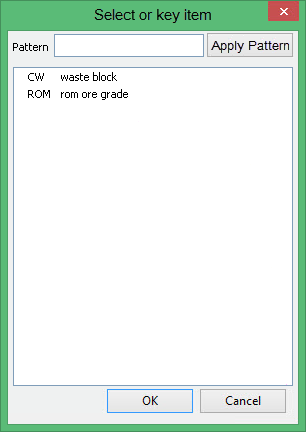
Click on the feature name and click OK. All objects that have this feature are shadowed. To select multiple features, use the left mouse button in combination with the Shift key to highlight the features (this is for features that are adjacent in the list, for non-adjacent features use the Ctrl key and the left mouse button) and click OK.
It is also possible to use the Pattern field, the Apply Pattern button and wildcards (* multi-character and ? single character) to highlight the features that begin or end with certain characters.
For example, if you wanted to highlight all features that begin with DEMO, then type DEMO* into the pattern field and click Apply Pattern. Once selected, all matching features are highlighted.
