

Report Filter 
Create a Report Filter
Use Report Filter to create or edit a filter that can be used to report on a subset of records from database objects ( Run Report option). The database may be a library, headered or ODBC link style database. Refer to the section on Databases for more information on the different styles of databases.
Database objects are also called database keys, referring to all the data associated with a particular database key name. For example: In a drillhole database, each drillhole is an object, consisting of its collar, assay, survey and geological data records.
The filter is associated with a design and consists of one selection statement for each record, and a set of fields for each record. The statement is similar to the clause after the WHERE keyword in an SQL statement with the word "record" representing an SQL table name.
Example - Report Filter Matching
Object (holeid) (east) (north) (rl)
The Report filter is saved into a specification file named <env>.repf in your current working directory.
Instructions
On the Geology menu, point to Drilling, and then click Report Filter to display the Define Report Filters panel.
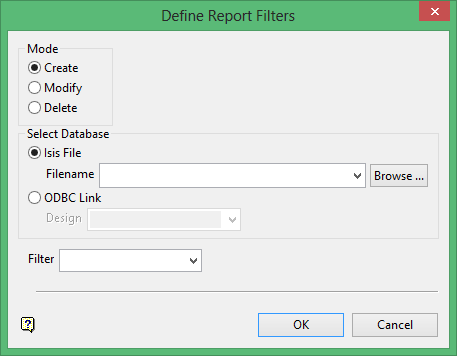
Use this panel to create a new report filter, as well as modify or delete an existing one.
Database
Enter, or select from the drop-down list, the name of the design (database) to which the report filter applies.
Filter
Enter, or select from the drop-down list, the name of the report filter.
Click OK.
The following panel is then displayed.

This panel displays for each record in the nominated design.
Report upon records in this table
Select whether or not to include a record. If checked, then you can enter a selection statement for the record and pick the required fields.
Click Next.
Technical Description of Report Filter Matching
The semantics/algorithm for which records in table X are to be reported is as follows:
for each record in table X for each possible set of one record from each non-X table plug field values from the set of records into the SQL-esque expression
i.e. If a set of records exists in an object (sets as constructed above), such that the expression is true, then the main record will be reported upon.
Technical Example
For three tables A, B, C A"s selection: A.DEPTH > B.FROM AND B.CU >= C.CU
will select a record Ax if and only if there exists a set of records (Ax, By, Cz) where Ax.DEPTH > By.FROM AND B.CU >= Cz.CU. So if there are 20 records of type B and 30 of type C in an object, there will be up to 20 * 30 = 600 expression evaluations for each record in A.
