

Drafting Sheet Editor: Design Line
Instructions
On the File menu, point to Drafting Sheets, then click Drafting Sheet Editor to display the following interface.
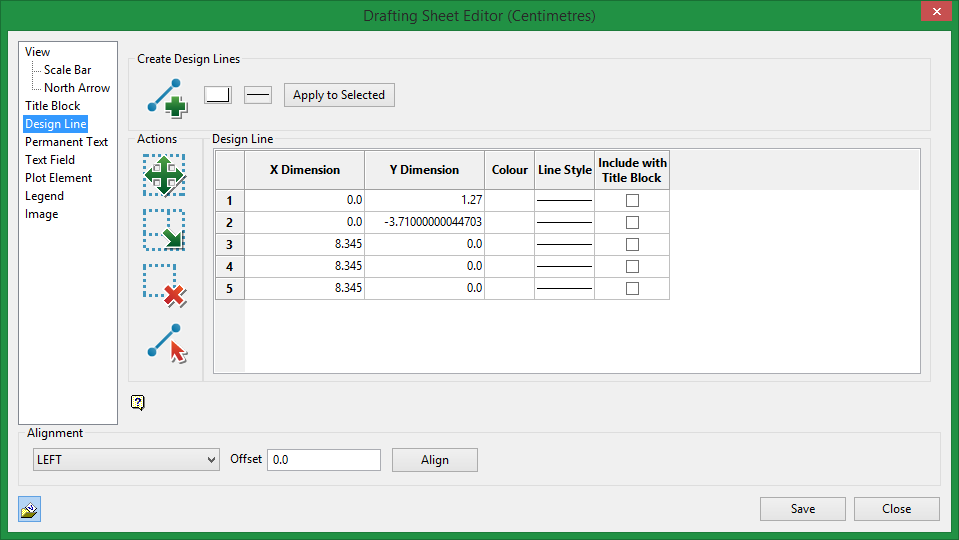
Create Design Line

|
Create a design line. |
Actions

|
Click on the Move icon to move a box on a sheet. |

|
Click on the Resize icon to change the size of a box on a sheet. |

|
Click on the Delete icon to delete a box on a sheet. |

|
Click on Select Line to graphically select a line or set of lines instead of selecting from the table. |
Design Line table
When you digitise a line it will automatically show up in the table. To make it straight up and down, make sure the X Dimension is set to 0.0.
You can adjust the colour and line style.
Include with Title Block
Select this option if you want to link the selected object to the title block and save it as part of a group. All items can be linked to a title block and reused as templates once they have been saved.
Related Topics
Was this page helpful?
