

Classic to extended convert
Use the Classic to extended convert command to convert a 'Classic' Vulcan block model into the 'Extended' block model format.
|
Format Comparison |
||
|
Classic |
Extended |
|
| Data allocation | All data must be allocated when the block model is constructed. | No data is stored when a block model is created. Disk space is dynamically allocated when values are stored into blocks. |
| Block model blocks | Restricted to 2x10⁹blocks. | Can exceed 1018blocks |
| Indexing | You require an amount of free disk space that is equal to the size of the actual block model. For example, if the block model is 4Mb in size, then you will need to have a minimum of 4Mb free disk space in order to perform the index procedure. |
No extra disk space is required in order to perform the index procedure. In a regular extended model the index is not stored, but is implied, so the model is always indexed. In a sub-blocked extended model the index is stored in such a way that it does not need to be rewritten, so the model remains indexed. |
| Miscellaneous | Models can be created very quickly. Model may contain a large number of blocks, well in excess of 4 billion blocks. Variables may be added and removed quickly. Disk space is only used for block values which are stored. |
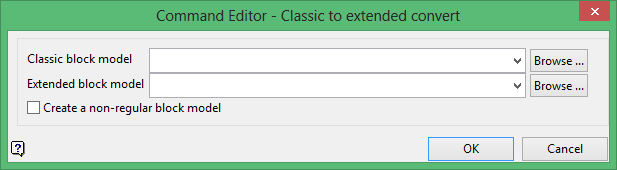
Classic block model
Select the 'Classic' format block model that you want to convert.
The drop-down list contains all block models found within the current working directory. Click Browse to select a file from another location.
Extended block model
Enter the name of the converted block model file. Selecting an existing file will prompt you to confirm that you want to overwrite the file's original contents.
The drop-down list contains all block models found within the current working directory. Click Browse to select a file from another location.
To create a new file, enter the file name and file extension.
Check the Create a non-regular block model check box to create a non-regular 'Extended' format block model. If this check box is not checked, then a regular 'Extended' format block model will be created instead.
Click OK to add the command and return to the Command Editor panel.
