

Traverse
The Traverse option to calculate the location of a foresight station by traversing.
Instructions
On the Survey menu, point to UG Survey, then click Traverse.
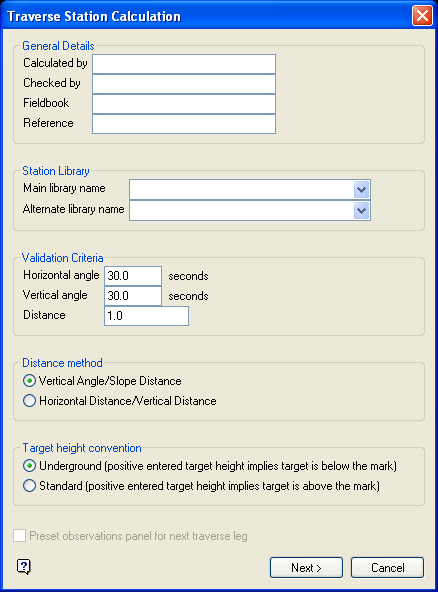
Figure 1: Traverse Station Calculation panel
Calculated by
This is an optional alphanumeric field of 20 characters for the name of the person that does the calculation. The default is 'Vulcan'.
Checked by
This is an optional alphanumeric field of 20 characters for the name of the person that checks the calculation. The default is 'Vulcan'.
Fieldbook
This is an optional alphanumeric field of 20 characters for the name of the field book.
Survey station library name
Enter, or select from the drop-down list, the name of the station library that contains the information of the instrument and backsight stations.
Temporary station library name
Enter, or select from the drop-down list, the name of an alternate station library that may have been used to store the information of the instrument and backsight stations.
Select Next.
The following panel is then displayed.
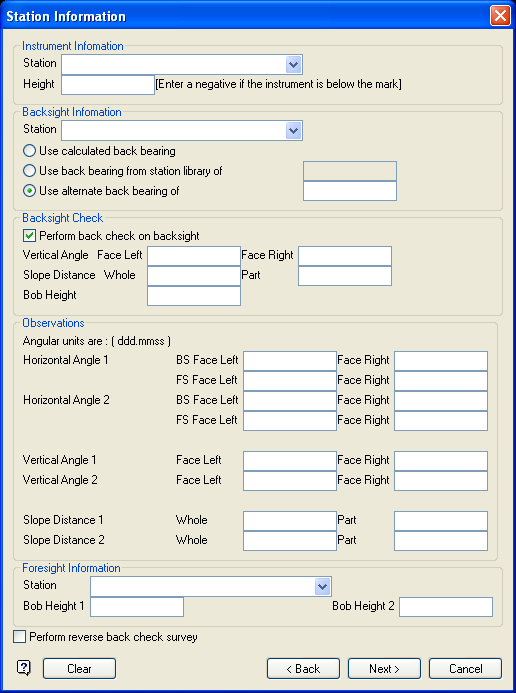
Figure 2: Station Information panel
Instrument Information
Station
Enter, or select from the drop-down list, the name of the instrument station that is stored in the station library or temporary station library specified on the previous panel.
Height
Enter the instrument height.
Backsight Information
Station
Enter, or select from the drop-down list, the name of the backsight station that is stored in the station library or temporary station library specified on the previous panel.
Foresight Information
Two sets of foresight measurements may be entered. The calculation uses the average of both sets.
Horizontal Angle
The foresight (FS) and backsight (BS) horizontal angles are measured by facing left and facing right respectively. If the angular unit is degrees, then the angles must be entered in the ddd.mmss format.
Vertical Angle
As above, but for the vertical angle.
Slope Distance
Both the whole and part distance must be entered. The final distance is the difference between the two.
Target Height
Enter the required target height.
Select Next.
If either of the stations could not be found, then the following panel then displays.
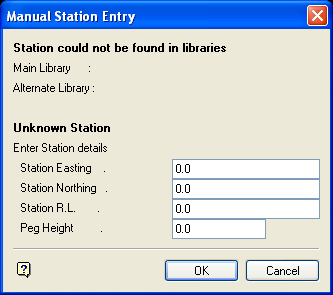
Figure 3: Manual Station Entry panel
This panel to enter the coordinates of the unknown station(s).
Select OK.
Once the stations have been entered, the following panel displays.
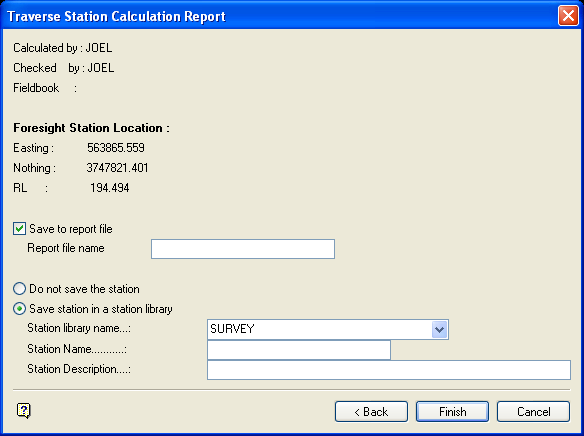
Figure 4: Traverse Station Calculation Report panel
Foresight Station Location
This section displays the calculated foresight station location. It is calculated from the instrument and backsight station's coordinates.
Save to report file
Select this check box to save the calculations report. The maximum size of the file name is 20 alphanumeric characters. The .txt extension will automatically be appended to the report file name.
Do not save the station
Select this option if you don't want to save the calculated foresight station.
Save station in a station library
Select this option to save the calculated foresight station. You will need to specify the library into which the station is to be stored, the station name (maximum 20 alphanumeric characters) and, optionally, a description (maximum 40 alphanumeric characters).
Select Finish.
The Traverse Calculations report is then displayed in the Report Window. See Appendix A for an example.
