

Part Volume
Calculate Cut and Fill Part Volumes
The Part Volume option to calculate an end area 'cut and fill' volume that is stored then subtracted from the next full volume calculation. The calculated volume displays in the Report Window of Vulcan.This option uses profiles generated in the Generate Profile option.
Instructions
- Select Survey menu
- Select Survey Volumes submenu
- Select Part Volume option
Indicate the start of the 'Section axis' as shown in the diagram below. All profiles that the Section axis intersects are included in the volume calculations.
In the following diagram, the profiles (solid lines, B to L, covering the survey area) are shown in plan view overlying the cross-section lines (A to L). Only the volume between profiles "B" and "G" is included in the calculation.
Figure 1: Cross Section Lines with Overlying Profiles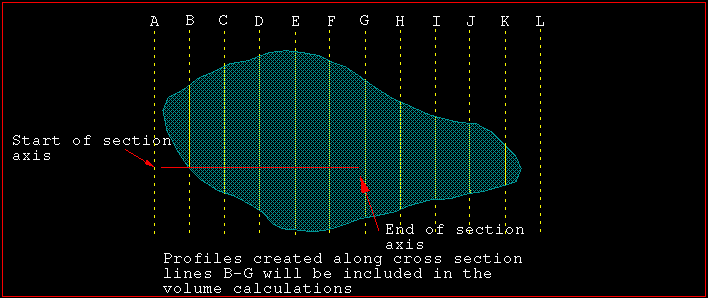
It is not necessary to have the cross-section lines displayed for volume calculations to be performed.
Indicate the end of section axis. Once indicated, only the total cut and fill volume between the first and last profiles intersected by the section axis is displayed in the Report Window of Vulcan. This cut and fill volume is stored and deducted from the next full Volume calculation. If another Part-Volume calculation is done (before doing a full volume calculation), then the earlier part-volume calculation is replaced by the new value.
A report similar to the one displayed in the Volume option is then displayed in the Report Window.
