

Create Bench Plan
Blast Selection Parameters
Instructions
On the Grade Control menu, click Create Bench Plan to display the Blast Selection Parameters panel.
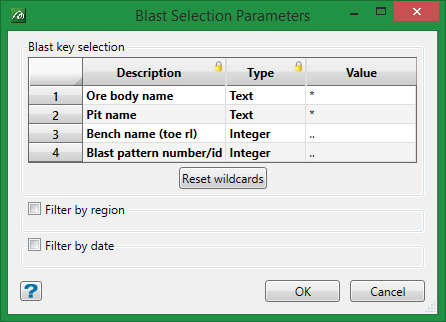
Description and Type Columns
These field cannot be edited. The values are populated from the descriptions found in the Grade Control Database > Blast Header > Key Fields.
Value Column
Enter a specific value or use a wildcard value.
Filter by...
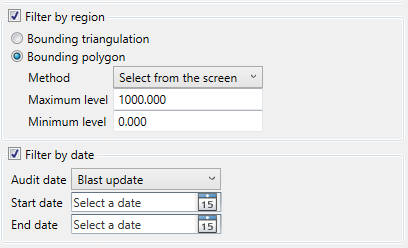
Selecting the options to Filter by region and/or Filter by date will expand the panel to reveal the options shown below.
Filter by region
This option allows you to constrain the blast holes by region using either a bounding triangulation or bounding polygon. If a polygon is selected, then the following methods are available:
-
Select from the screen
-
Digitise
-
Digitise rectangle
Filter by date
This option allows you to constrain the blast holes by date. Select from choice of Audit dates, the select the starting and ending dates.
-
Blast update
-
Boundary update
-
Grade block update
-
Reconciliation update
Click OK.
