

New Transformation
Perform log normal, normal score, or capping transformations on your data.
On the Data tab, in the Create Data Modifiers group, click on New Transformation.
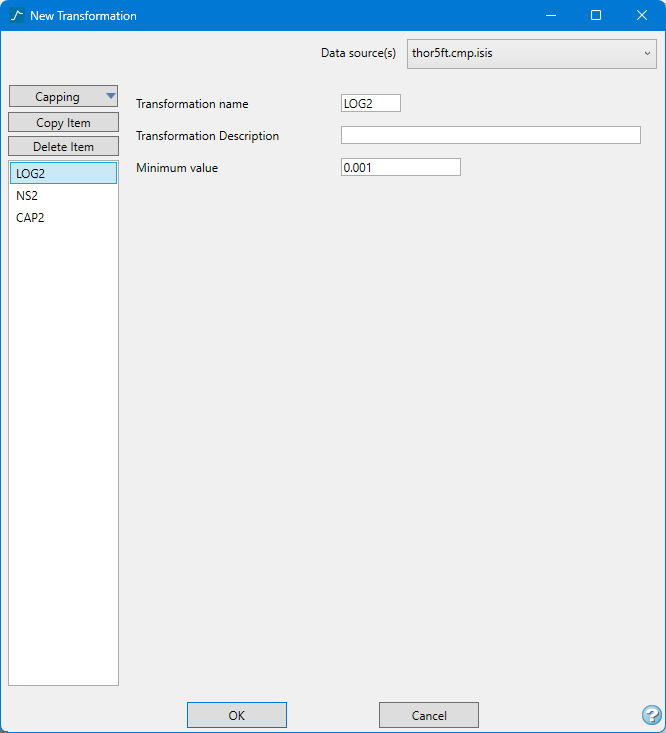
Follow these steps:
-
Select the type of filter you want to create by clicking the top button on the left side column.
There are three types of filters: Log, Normal Scores, and Capping.
Note: The text on this button will change based on your selection from the drop-down list.
Click the Copy button to create a new filter using all the parameters of the current filter that is in focus.
Click the Delete button to delete the current filter that is in focus.
Important: Warning! If you delete a filter, the operation cannot be undone!
-
Select the Data source(s) by using the drop-down list in the upper right corner.
-
Enter a name for the new filter into the field labelled Transformation name if you do not want to use the default name.
There are no character restrictions. As you type a name, it will be display in the column on the left side. The column of names will always be visible while you are editing in the panel.
Note: When a transformation parameter is first created the name is highlighted in red, indicating that there is still something that needs to be done before the filter is ready to be saved. While a filter is highlighted in red, the OK button will not be in focus and you will not be able to click it to save any changes.
-
In the textbox labelled Transformation Description, you have the option of entering a description.
-
Enter the parameters for the transformation.
 Log
Log

-
Enter a name.
-
(Optional) Enter a description.
-
Enter a minimum value. By default, this field is set at a value of 0.001. Recall that log transformations cannot be applied to zero or negative values.
Normal Scores
-
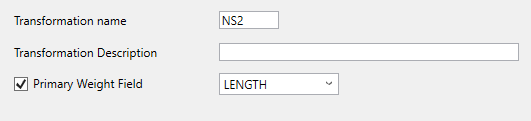
Enter a name.
-
(Optional) Enter a description.
-
(Optional) Click Primary Weight Field, then select the field from the drop-down list.
Capping
-
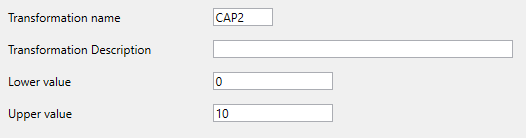
Enter a name.
-
(Optional) Enter a description.
-
Enter a minimum and maximum value. Samples outside of these limits will still be used, but their values will be raised or lowered to match the caps.
-
Applying the transformation
To apply the transformation to a dataset follow these steps:
-
Highlight the data selection in the Data Explorer pane.
-
On the Data tab, in the Apply Data Modifiers group, select the weighting scheme from the drop-down list next to Apply Transformation.
-
Click Apply Transformation.
Or
-
Right-click on the data selection in the Data Explorer pane.
-
Select Apply > Apply Filter and Transformation .
