

Save As
Use the Save As option to save a created or edited line style into the line style database ( lines.dgd.isis) with a new name and/or description. The line style database is located in the ENVIS_RESO a rea.
It is also possible to change the name and/or description by right-clicking on the line style name in the Vulcan Explorer (Resources Tab - Line Style Databases folder) and selecting Save As from the context menu.
Instructions
On the File menu, point to Line Styles, and then click Save As to display the Save Line Style As panel.
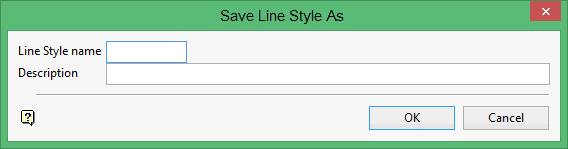
Line Style name
Enter the name that will be assigned to the new or edited line style. The maximum size is 6 alphanumeric characters (spaces are not allowed). In the case of editing a line style, the default name will be the name allocated when the style was created or last edited.
Description
Enter a description to further describe the contents of this layer. The description can be up to 80 alphanumeric characters and may include spaces. If a description is not entered, then a default description will be used instead. If the chosen layer already has an assigned description, the description displays when the layer is selected. Existing layer descriptions can be overwritten.
Click OK.
The line style is saved with the new name.
