

Data Hierarchy
The data in Vulcan is structured into five levels:
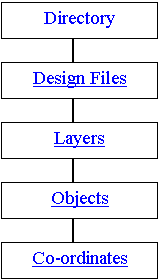
- At the topmost level is your current working directory. This is the folder from which you start Vulcan.
- Each folder is divided into various design databases. Each design database may contain data relating to single map sheets covering the same defined area (see Creating a Job Specification File ). Alternatively, a file may be dedicated to a particular type of data, for example contours, roads or to a particular discipline, for example geology, survey.
In any Vulcan session, the contents of all files may be edited, underlayed (as a non-editable layer), or composited to create new data files. - Each database is divided into logical data groups called layers. A layer usually brings together a group of similar objects and data. For example, in a file representing a map sheet, all 200 metre contours may be in one layer and 100 metre contours in another layer. Vulcan also reserves special layers for its own use.
- Layers in turn are divided into graphical entities which are called objects. An object usually defines a physical feature, such as a single contour string or a block of annotation text. It is at the object level that graphical attributes, such as colour, line type and pattern fill, are defined.
- The final level is the individual coordinate point or line of text in the object. Each point or text line may be independently edited.
Related topics
Was this page helpful?
