

Period Labels
Define Period Labels
Use the Period Labels option to define a format for the target polygon labels. The target polygons are generated by the targeting process.
Tip: To run this option from the command line, type:
PERIOD_LABELS /label_format='format string' /save_period_labels /start_year=value
for example PERIOD_LABELS /label_format='Period %D (%D)' /save_period_labels /start_year=1.0.
Instructions
On the Rsvute menu, point to Reserves, and then click Period Labels to display the Period Labels panel.
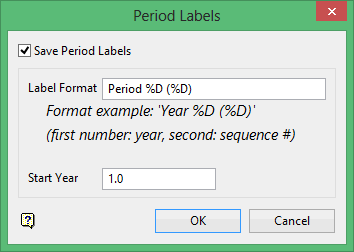
Save Period Labels
Select this check box to save the labels with your target polygons.
Label Format
Enter the label format, which can be any string with the %D format specifier embedded. When the label is generated, the first %D is replaced with the year, the second %D is replaced with the sequence number.
For example, a format string of Year%D (%D) will return the following labels depending on starting year:
Year 2014 (1) Year 2014 (2) Year 2015 (1) Year 2015 (2). . .. . .
Start Year
Enter the year of the first period. Although the value is referred to as "year", you can treat this value as months, days, etc. If a starting value of 0 is entered, then the period itself displays.
Click OK.
