

Sequence toolbar
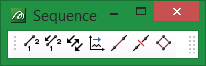
|
Icon |
Tooltip |
Description |

|
Resequence |
Allows you to change the starting location for an object's point sequence. Refer to the Design > Point Edit > Resequence option for more information. |

|
Reverse |
Allows you to reverse the point sequence of a nominated object. Refer to the Design > Object Edit > Reverse option for more information. |

|
Consistent |
Allows you to make all point sequence directions the same. Refer to the Design > Object Edit > Consistent option for more information. |

|
Sort |
Allows you to sort the point sequence along a nominated axis direction. Refer to the Design > Object Edit > Sort option for more information. |

|
Connect |
Allows you to connect points. Refer to the Design > Point Edit > Connect option for more information. |

|
Disconnect |
Allows you to disconnect points. Refer to the Design > Point Edit > Disconnect option for more information. |

|
Connection |
Allows you to connect/disconnect all points. Refer to the Design > Object Edit > Connection option for more information. |
