

Split by Horizons
This option allows triangulations to be split by a set of surfaces.
This is a stratigraphic-oriented splitting tool and makes certain assumptions about the surfaces. The assumptions are consistent with stratigraphic modelling.
The surfaces can be triangulations, structural grids (.sfg, .srg) and roof and floor surfaces (.srt, .sft) or, optionally, topography grid (.tpg).
Surfaces can be selected by providing a (.glob) file. From the (.glob) file, Vulcan will extract the (.srt), (.sft), (.sfg) and (.srg) file names. If there is a <ProjectCode>TOPO.tpg file, it is also added to the top of the surface list as the upper limiting surface for the whole process. Optionally, you can select a topography surface.
Naming Convention
The name of the resulting triangulations starts with the name of the solid followed by underscore and suffix.
The suffix depends on the surface selection method.
If the surface was provided by the glob file, the suffix for the bottom most solid is waste, for the solid between <horizon>.sfg and <horizon>.srg the suffix is <horizon>_prod, for solid above <horizon>.srg the suffix is <horizon>_waste.
If surface is provided by the surface list, the suffix for the bottom most solid is base, for each sub-solid the suffix is the filename of the bottom surface, the topmost solid has a suffix top.
On the Model menu, point to Triangle Solid, then click Split by Horizons to display the following interface.
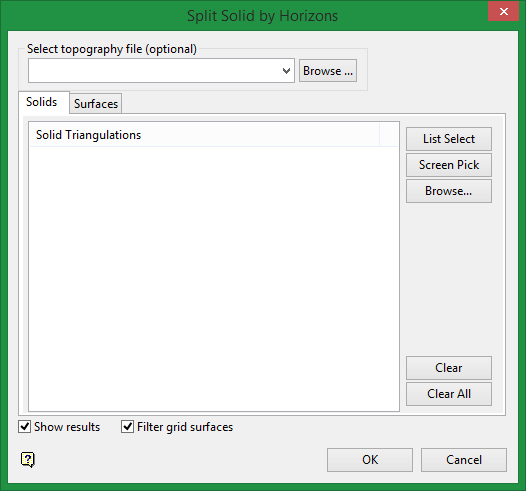
Select topography file (optional)
If topography is provided, only the portion of a solid below the topography will be used. The solid part above the topography is discarded prior to splitting. If topography should not be used, leave the combobox blank or clear it.
Solids tab
Select the solid triangulations that you want to split, either by using the list select tool, screen picking the triangulations, or by browsing for the required solids.
Surfaces tab
Select the surfaces that you want to use to split the solid. The same selection methods are available.
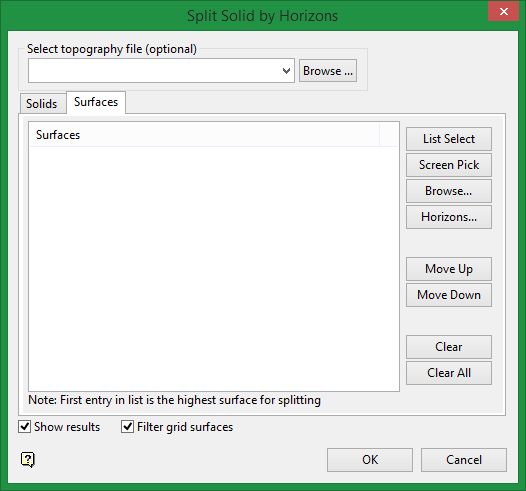
Horizons
This permits the selection of a glob file to populate Surfaces tab.
Note: If the topography grid is present in the glob file, you will need to remove the topography surface from the Surfaces tab because it will be coincident with the surface in the Select topography combobox and can lead to slow calculations and potential errors.
Important: The order of the surface triangulations is important, and must be in the order from the lowest surface to the highest. The glob file provides that ordering. For other input methods, you can use the Move Up or Move Down to re-order the surfaces.
Show results
Select this option if you want to see the splits displayed after the operation is finished.
Filter grid surfaces
Selecting this may result in faster processing. It reduces the number of triangles in the processed triangulations by grouping triangles within flat areas. An area is considered flat if its variation does not exceed 0.01.
