

Convert to pexel image
Use the Convert to pexel image command to convert a Vulcan block model (.bmf) into a pexel file based on the colour legend of a specified variable in the model.
Tip: Pexel files can be used in Vulcan for draping colours over triangulations.
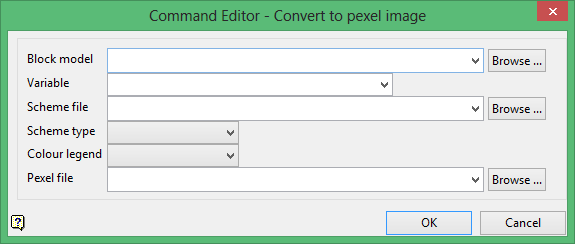
Block model
Select the block model that you want to convert.
The drop-down list contains all block models found within the current working directory. Click Browse to select a file from another location.
Variable
Select the variable whose values are to be used in the conversion. The list contains all variables found in the nominated block model file.
Scheme file
Select a Vulcan colour legends file (.scd). The list contains all .scd files found in the current working directory.
Scheme type
Select a scheme type from the list. The list contains all schemes in the specified .scd file.
Colour legend
Select a colour legend from the list. The list contains all available colour legends in the specified .scd file.
Pexel file
Enter the name of the resulting pexel file (.pexel). The list contains all .pexel files found in your current working directory. Click Browse to select a file from another location. Selecting an existing file will prompt you to confirm that you want to overwrite the file's original contents.
To create a new file, enter the file name and file extension.
Click OK to add the command and return to the Command Editor panel.
