

Edit variable attributes
Use the Edit variable attributes command to edit attributes, such as the variable name, default value and description, for variables found in a nominated block model.
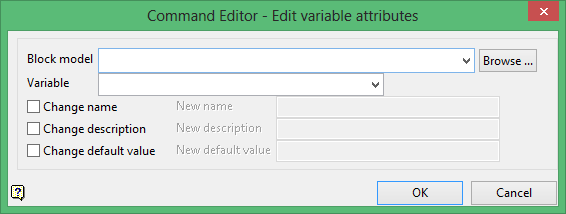
Block model
Select the block model containing the variable that you want to edit.
The drop-down list contains all block models found within the current working directory. Click Browse to select a file from another location.
Variable
Select the variable that you want to edit. The drop-down list contains all variables found in the nominated block model.
Change name
Select this check box to assign a new name for the chosen variable. The new name must not already exist in the block model.
Change description
Select this check box to assign a new description for the chosen variable. If this check box is checked, and the available field is left blank, then the old description will be retained.
Change default value
Select this check box to assign a new default value for the block model.
Note: Changing the default values does not result in the values stored in the block model being altered.
Click OK to add the command and return tot he Command Editor panel.
