

Index model
Use the Index model command to create a spatial index to reference a block model. The spatial index decreases the access time to the blocks and therefore is particularly useful as models increase in size.
Notes An equal amount of free disk space is required when indexing a 'Classic' block model. For example: If the block model is 4Mb in size, then you will need to have a minimum of 4Mb free disk space in order to perform the index procedure. Extra disk space is not required when indexing an 'Extended' block model. You can also index a block model by right-clicking on the block model in the Vulcan Explorer and selecting Index model from the displayed context menu.
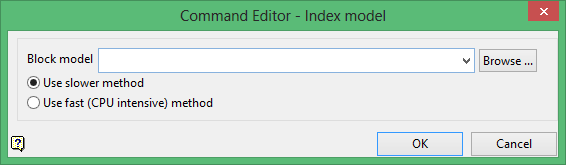
Block model
The drop-down list contains all block models found within the current working directory. Click Browse to select a file from another location.
Use slower method
Select this option to use the slower indexing method. You can continue working in Vulcan while the model is being indexed.
Use fast (CPU Intensive) method
Select this option to use the fast indexing method. Using this option may mean that other processes cannot be carried out while the model is being indexed.
Click OK to add the command and return to the Command Editor panel.
