

Create Sphere
Use this tool to create a sphere. The required parameters consist of interactive onscreen selection of object centroid and radius, followed by a panel input where the name, colour and quality will need to be defined.
On the Model menu, point to Triangle Solid, then click Create Sphere.
Follow the onscreen prompts to select the centroid and radius of the sphere.
When completed, the following interface will be displayed:
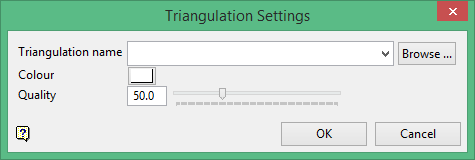
Name
Type a name or select one from the drop-down list.
Colour
Click the colour icon to reveal the colour palette, then select a colour for the new sphere.
Quality
Highlight the numbers in the textbox and enter a number between 10 and 150, or use the slider control to select the resolution quality of the new sphere. The higher the number, the higher the resolution.
Click OK
