

Mapfile Build Macro
Use the Mapfile Build Macro option to create a macro for generating standard and composite mapfiles.
Instructions
- Select Geology menu
- Select Drilling Utilities submenu
- Select Mapfile Build Macro option
The following panel is displayed.
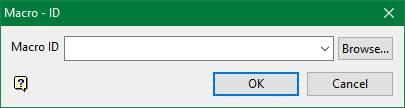
Macro ID
Enter, or select from the drop-down list, the name of the macro identifier. All macro setup information is stored in separate specification files named user_id.mapfile_spec. When the mapfiles are generated from these specification files, a macro is automatically created and named user_id.bhg_cmnd.
Select OK.
The Isis Mapfile Generation interface is then displayed.
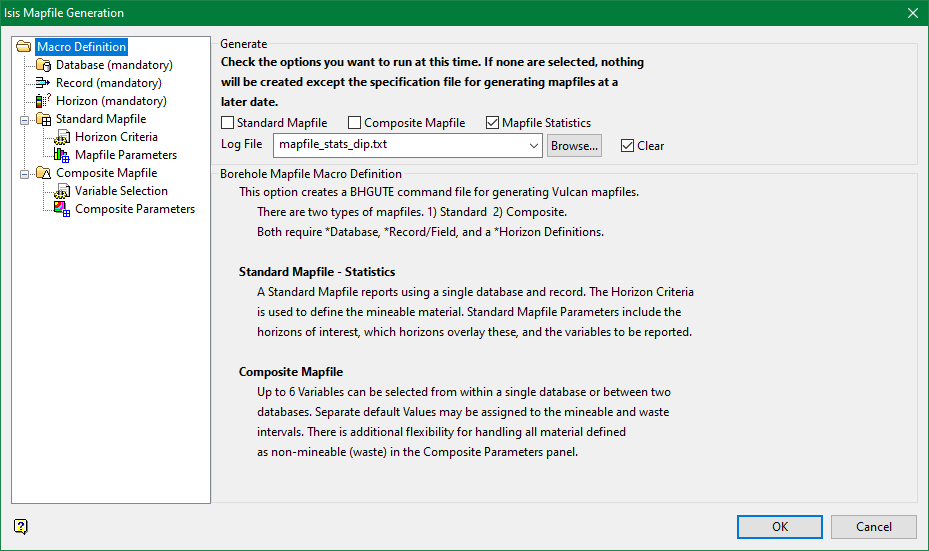
Standard Mapfile
Select this check box to generate standard mapfiles from the current macro definition. A standard mapfile contains information for modelling the structural components of the data.
Composite Mapfile
Select this check box to generate composite mapfiles from the current macro definition. A composite mapfile contains information for modelling the analytical or assay types of data.
Mapfile Statistics
Select this check box to generate mapfile statistics from the standard mapfile macro definition.
The resulting mapfile statistics and/or mapfile generation information can be saved to a nominated log file.
Log File
Select the log file that will be used to store the resulting statistics and/or mapfile generation information.
Clear
Select this check box to clear and overwrite the contents of the chosen log file prior to saving the resulting statistics and/or mapfile generation information. If this check box is not ticked, then the resulting information will be appended to the chosen file.
