

To Shaft View
Transfer Design Data to a Shaft Transformation Window
Use the To Shaft View option to move from a 3D window to a shaft transformation window copying the design data displayed in the 3D window.
Instructions
On the View menu, point to Shaft View, and then click To Shaft View to display the Layer transfer details panel.
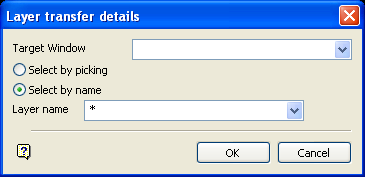
Target window
Enter, or select from the drop-down list, the shaft transformation window to which you want to transfer data.
Data to be transferred can be selected by picking or by name. However, the name option only applies to layers. Use the picking option to transfer triangulations.
Select by picking
The Select by picking option will prompt you for the type of data to be transferred (layer or triangulation). If layer is chosen, select an object from the required layer. If triangulation is chosen, select the required triangulation. Once selected, the data is transferred to the shaft window and you can select another layer or triangulation.
Select by name
The Select by name option to specify a layer name. Wildcards (* multi-character and % single character) may also be used.
Click OK.
The view changes to the selected shaft transformation window, which contains the selected data. Refer to the Overview section for editing considerations.
