

Interrogate Generated Models
Use this option to interrogate the generated washability models and generate the interpolated wash table output.
Instructions
On the Washability menu, click Interrogate Generated Models.
If the wash models haven't been opened before, it displays the Interrogate Generated Washability Models panel which is similar to the Open Generated Models Grouppanel.
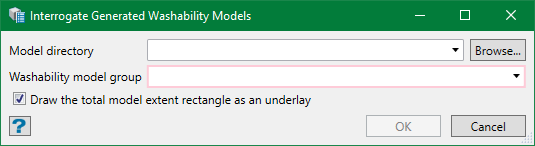
If the models have been opened already, then the following panel is displayed.
Note: If you need to close the opened models in the current Vulcan session, on the Washability menu click Close Models Group.
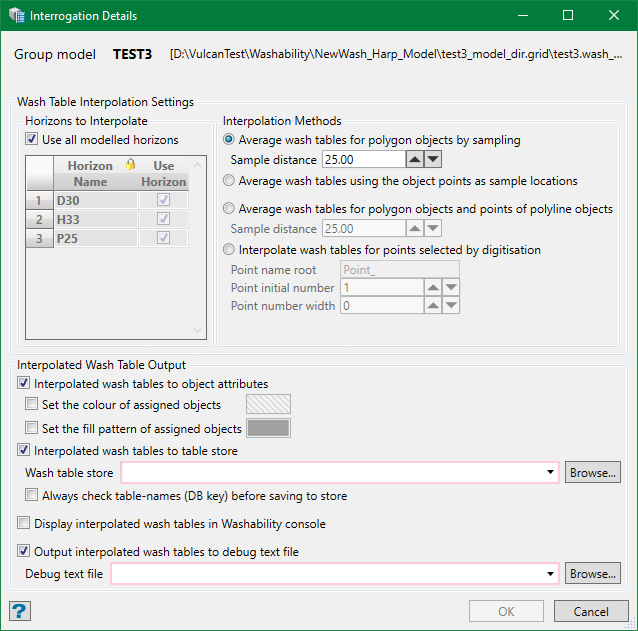
Wash Table Interpolation Settings
Horizons to Interpolate
Use all modelled horizons
Select this checkbox to use all horizons for which washability models are available. Alternatively, you can uncheck this option to choose only the horizon(s) that you want by selecting the checkbox under Use Horizon column in the grid.
Interpolation Methods
There are four methods to interpolate the wash models.
Average wash tables for polygon objects by sampling
This option determines the average wash tables for each required horizon of a polygon object. These are made by interpolating a number of wash tables for each horizon from the model across the polygon at the specified sampling distance. The weighted average of these wash tables for each horizon becomes the average table for that horizon for the given object. Weightage is calculated by horizon thickness (horizon raw ID if modelled).
Sample distance
Specify a suitable sample distance for the polygon area. The smaller the distance the more samples will be taken. This will default to the model size - there is not much point sampling less than 0.25 this distance. If too large a distance is chosen to get any points in a polygon, the internal centre point position will always be used.
Average wash tables using the object points as sample locations
This option determines the average wash tables using object points as sample locations. This can be used when you want to define an object containing custom sample locations.
Average wash tables for polygon objects and points of polyline objects
This option determines the average wash tables for each required horizon for each object. These are made by combining the techniques of the two methods discussed above. Polygons are treated by sampling regularly at a specified sample distance and polylines are treated as a scatter of sample points.
Interpolate wash tables for points selected by digitisation
This option interpolates a wash table at each point selected for each required horizon from the model.
Point name root
Used to name the wash tables produced suffixed by the point number and horizon name. Eg. <Point_Name>_<Point_Number>_<Horizon_Name>
Point initial number
Used to specify a value from which the point number starts.
Point number width
Used to specify the length of point number. For example, if the initial point number is 5 and the width is set to 3, the point number becomes 005 i.e. set to three digits. By default, the value is 0 which means the point number is exactly the original length.
Note: For the first three methods, the default table name will be in the format LAYER::OBJECT::HORIZON. However, when digitising points (fourth method) there is no layer and objects names. Therefore, the default name takes the format POINT NAME::POINT NUMBER::HORIZON.
Interpolated Wash Table Output
Interpolated wash tables to object attributes
By selecting this option, you can add the interpolated wash table to the header attributes of the selected object. This is not available for digitising points. Optionally, you can change the colour/fill pattern of objects thus edited.
Interpolated wash tables to table store
Wash table store
Choose from the drop-down list or browse a wash table store database to store the interpolated wash tables.
Always check table-names (DB key) before saving to store
The automatically assigned table name is made up of <Layer_Name>::<Object_Name>::<Horizon_Name>for objects selected, or <Point_Root_Name> <Point_Number>::<Horizon_Name>for interpolated points.
The maximum key length is 40 characters. If the names are greater than this maximum value, the Review Table Names for Store panel is displayed from where you can manually edit the names to a suitable length. However, the panel may be displayed if this option is selected, even if the names are less than the maximum value.
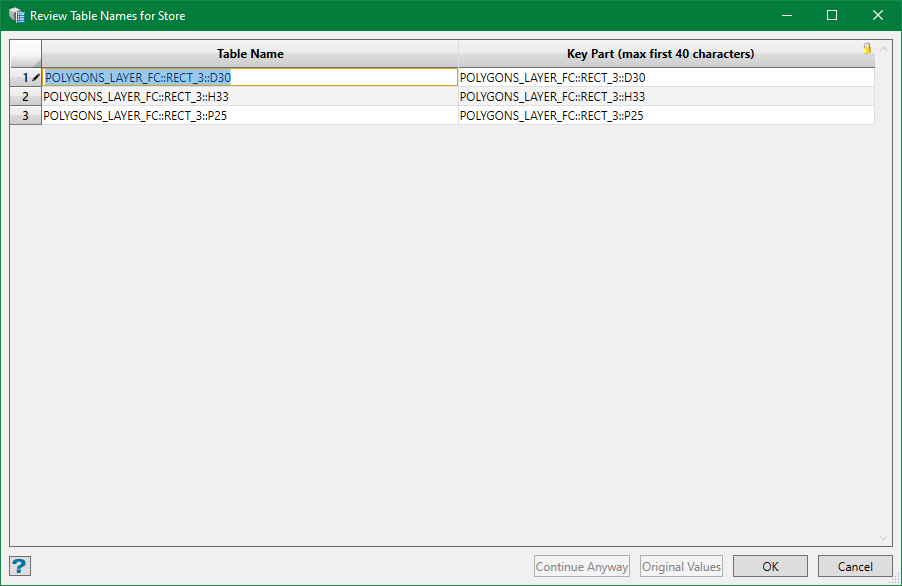
Click on the table name in the grid to edit. In case you mess up with the edits, click Original Values to reset to the original name.
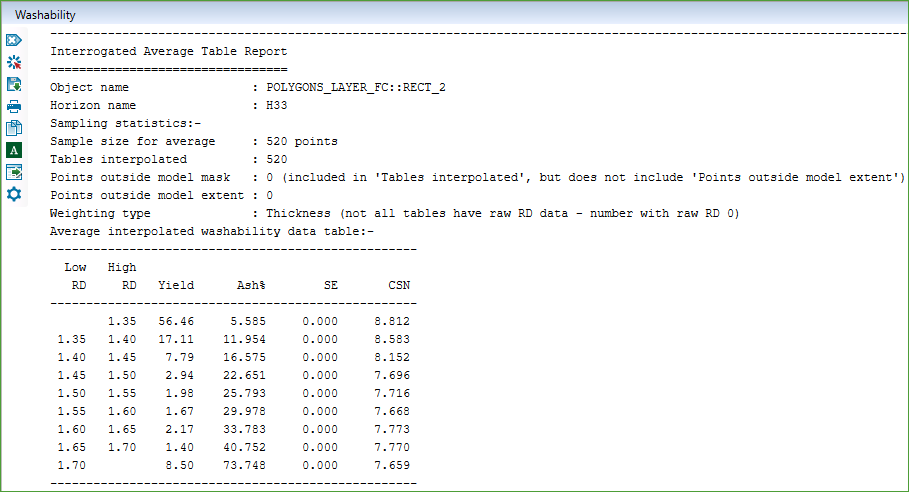
Display interpolated wash tables in Washability console
Selecting this option displays the interpolated wash tables in the Washability console of Vulcan. Shown below is an example.
Output interpolated wash tables to debug text file
Select this option to save the interpolated wash tables in a text file. Choose an existing text file from the drop-down list or browse from a different directory, or simply type in a new filename.
