

Remove From Rose
Remove structural data from a Rose Diagram
The Remove From Rose option to remove the structural data displayed on a Rose Diagram in the Rose Diagram Window. To do this, the Remove From Rose option will actually clear the relevant layer.
Instructions
- Select Geotech menu
- Select Display submenu
- Select Remove From Rose option
The following panel displays.
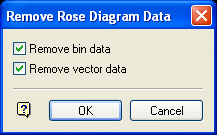
Remove Rose Diagram Data panel
Remove bin data
Select this check box to remove all the bins on the Rose Diagram. This should be done if the bin size has been changed (see the Set Up Rose Diagram option).
Remove vector data
Select this check box to remove the vector lines. As above, this should be done if bin sizes have been changed.
Select OK.
The data is then removed.
Was this page helpful?
