

Upload
Upload Files to Instrument
The Upload option to select a created upload file (refer to the Create option) and upload it to the specified data recorder. The option is not available for CRTR400 upload files (currently Vulcan caters for CRTR400 download files only).
Note: This option is used when the instrument is connected via a serial port. It is not required when using a PC card reader, such as is available with the WILD/LEICA instruments. If the data recorder is not available, or there are communication problems, then Vulcan will try for 15 seconds and then issue an error message.
Instructions
- Select Survey menu
- Select Surveying submenu
- Select Upload option
If you chose to use an alternate communications application (set through the Set Up option), then the following panel displays.
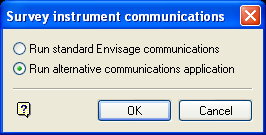
Survey instrument communications panel
Run standard Vulcan communications
Select this option to run the standard Vulcan instrument interface.
Run alternate communications application
Select this option to run the alternate communications application that was chosen in the Set Up option.
Select OK.
Upload files are selected from the panel's drop-down list, the other options will relate to the instrument type. The drop-down list contains only the upload files that match the instrument type.
If there are upload files, then the panels associated with the specific instrument displays. If you chose to run an alternate communications application, then the panels associated with that particular application displays instead.
GRE4
GIF10
GEODAT
SDR22
SDR33
LEICA_TPS1000
COLLECTECH
TRIMBLE GPS
Various other panels may appear depending on the selected instrument, but the upload should continue on and complete.
Note: If there are any errors, then these are commonly related to the communications parameters stored in the perif.setup file. These must be identical to the parameters used by the instrument.
For example: If your instrument is set to 9600 baud rate, 8 character bits and on stop bit with no parity checking, then the perif.setup file should also be set to these parameters.
