

Import MineSight Block Models
Instructions
On the File menu, click Import, then click MineSight in the File Format column on the left side of the Import panel, and select Block Models for File Type on the right.
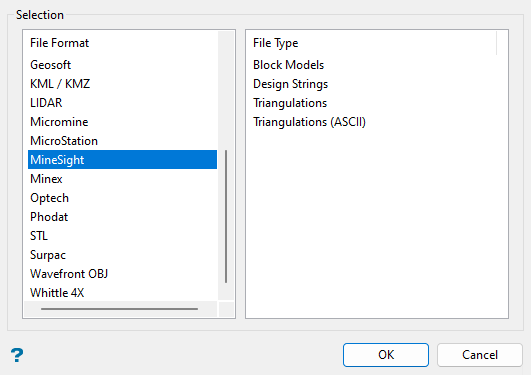
Click OK to open the panel used to import MineSight block models.
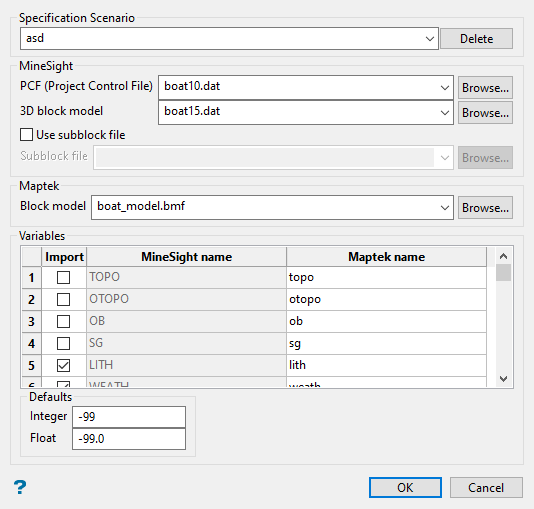
Specification Scenario
To create a new specification scenario for future use, simply type a new name into the field. You can also select an existing specification scenario file from the drop-down list. If desired, select a file and click Delete to delete the selected specification scenario.
MineSight
The MineSight block model files themselves can have any extension, but the PCF (Project Control File) is coded 10 and the actual block model data is in a file coded 15.
Example: gras15.201 or gras10.dat
The .201 extension is meaningless, but because it has the 15 code before the extension and a preceding file name that is associated with a corresponding 10.dat PCF file, this model data can be imported with the selected PCF file.
Select the <name>10.dat PCF (Project Control File) from the drop-down list. Next, select the associated <name>15.<extension> 3D block model file from the drop-down list. Select the Use subblock file checkbox if needed to select from the Subblock file drop-down list. The drop-down lists show available files from the current working directory. Click Browse... to select files from a different location.
Maptek
You can select an existing Vulcan block model file (.bmf) to import to from the Block model drop-down list, which includes files in the current working directory, or type a new name to create a new block model. Click Browse... to select a file from a different location. If you attempt to import to an existing block model, then you will need to confirm that you want to overwrite the selected block model, or click Cancel.
Variables
Use the grid to select which variables you want to import into the Vulcan block model. You can rename a variable by replacing the name in the Maptek name column.
Defaults
Enter the defaults for integer and float values that are missing.
