

Add text variable
Use the Add text variable command to add a text variable to a nominated block model. This command only allows a single text variable per input file to be added.
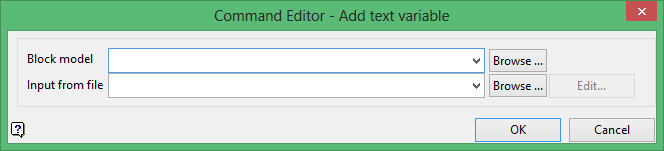
Block model
Select the block model that you want to add the variable to.
The drop-down list contains all block models found within the current working directory. Click Browse to select a file from another location.
Note: A block model can only contain up to 300 variables.
Input from file
Select the file that contains the information for the text variable. The drop-down lists contains all files found in the current working directory. Click Browse to select a file from another location.
The format to the input file should be:
Line 1: [Variable name] [Default Value] [Description]
Line 2: Number of conditions
Line 3 and following in pairs: First line: Variable Value Second line: Condition
For example:
material none Material Classification
3
high
au ge 3
medium
au lt 3 and au ge 0.5
low
au lt 0.5
If you were to use the contents of the example input file (shown above), then you would be creating a text variable named 'material', with a default value of 'none' and a description of 'Material Classification'. Three conditions would be read from the nominated file along with the values corresponding to each condition:
-
- The value for the material variable will be 'high' if the
auvariable value is greater than or equal to 3. - The value for the material variable will be 'medium' if the
auvariable value is greater than or equal to 0.5 AND less than 3. - The value for the material variable will be 'low' if the
auvariable value is less than 0.5.
- The value for the material variable will be 'high' if the
Click OK to add the command and return to the Command Editor panel.
