

Delete Database
Use the Delete Database option to delete an Isis database or an ODBC link file.
An Isis file can be a regular database, in which case the database is deleted, or it can reference an ODBC data source, in which case, the Isis file will be treated as an ODBC link file.
If you try to delete a database that is being used by another user, a warning displays to inform you that the databse is locked. To maintain databse integrity, only one user is able to write to it at a time.
If you choose to delete a database, you are prompted whether to delete the entire database or only the ODBC linked design.
Note: Some Isis files can also be ODBC link files. that is,, files created using Isis : Utilities : Convert ODBC dsf to Headered ODBC.
Instructions
On the File menu, click Delete Database to display the Delete Database panel.
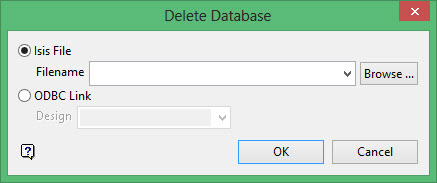
Isis File
Select this option to delete an Isis File database. You will need to enter, or select from the drop-down list or browse to, the filename.
ODBC Link
Select this option to delete an ODBC Link database. Select the design names from the drop-down lists.
Click OK.
