

Set Up
Set the default parameters
The Set Up option to set the default parameters that are used by the options under the Section submenu. The parameters are stored in the <proj>envis.defaults specification file, which can be found in either your current working directory or in the $ENVIS_RESO area.
Instructions
- Select Geotech menu
- Select Section submenu
- Select Set Up option
The following panel displays.
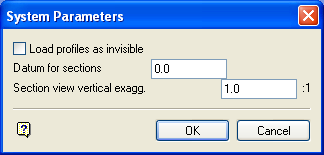
System Parameters panel
Load profiles as invisible
Select this check box to load section design layers with only the section lines visible. If this checkbox is not ticked, then both the section lines and profiles will be visible. This is useful when using a large amount of data.
Datum for sections
Enter the datum level at which any further section lines will be created.
Section view vertical exagg.
Enter the vertical exaggeration (multiplying factor) to be used when displaying a section (see Section View option).
Select OK.
The defaults are then stored in the <proj>envis.defaults file. These defaults will apply whenever Section Design work is carried out, or until they are changed.
