

Geographic
Use this option to convert coordinates from one coordinate system to another
Instructions
On the Design menu, point to Transformation, then click Geographic.
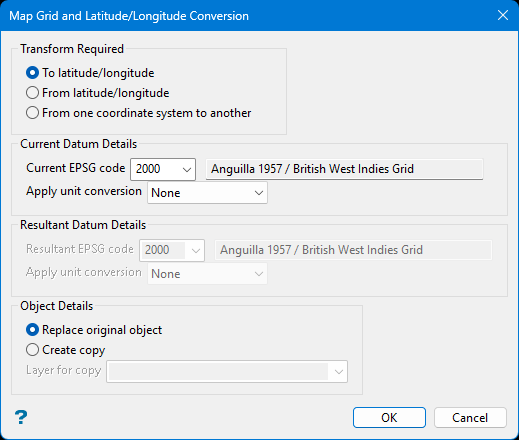
Follow these steps:
-
Choose the Transform Required.
Option Description To latitude/longitude Convert map grid coordinates to geographic coordinates. Enter the current grid and zone.
From latitude/longitude Convert geographic coordinates to map grid. Enter the resulting grid and zone.
From one coordinate system to another Specify both current and new zones.
-
Define the Current and Resultant Datum Details.
For both the Current datum and the Resultant datum, you can choose the EPSG code by selecting it from the drop-down list, or by typing the name of the datum into the box labelled Find by name.
(Optional) Select the type of conversion from the Apply unit conversion list if you want to apply a unit conversion.
Tip: You may find the epsg.io/transform website useful when considering which EPSG code to use.
-
Choose the processing method.
-
Select Replace Original Object to directly transform the existing object.
-
Select Create Copy to generate a transformed copy. You’ll be prompted to enter a new layer name.
-
-
Confirm and select the items to apply the transformation.
Click OK to begin the process.
The Multiple Selection box will appear. Use it to choose which objects to transform.
-
View the transformed data. Transformed objects may fall outside the visible range. Navigate to View > Windows > Fit Layer to adjust and display the updated coordinates.
