

Assign
Convert Objects to Structural Data Objects
Use the Assign option to convert Vulcan objects, such as lines representing faults, to records in the structural database. Each object can then be used as a 3D structural object representing the structural record that it has been assigned to.
The site identifier field SITEID is used as the link between each object and the structural data that it represents. The site identifier value can either be entered for each object, or taken from the name attribute for each selected object.
Prior to using this option, you should create a record in the structural database in a "Mining Area" and put in the required field information.
Header Record: AREA Record 1 : DIPDIR DIP TYPE SITEID
Either Isis or the Digitise option (under the Geotech > Utilities submenu) can be used to put this information into the structural database.
Instructions
- Select Geotech menu
- Select Analysis submenu
- Select Assign option
The Multiple Selection box displays. This allows you to select objects by category. Upon selection, the following panel displays.
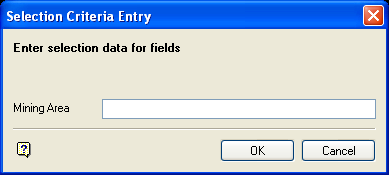
Selection Criteria Entry panel
Mining area
Enter the area that the structural records to be searched are associated with. The search for the mining area in the structural database is case sensitive, that is M is different from m. Wildcards are allowed.
Click OK.
Upon acceptance, you will be prompted as to whether or not you want to use the object's name attribute as the site identifier. Yes causes the site identifier field value to be taken from the name attribute for each object selected. No highlights each object in turn and prompts for the site identifier value.
When the structural record with matching site identifier is found, the object attributes are modified so it can be recognised as a 3D structural data object. If the structural record with matching site identifier is not found, no object attributes are modified.
The object name is changed to be the site identifier field value (even if the 'Use object name as site identifier' option was not selected). The object description contains the structural database and the mining area names. The object value is replaced with the record number in the structural database. Also, the feature code is changed to indicate the type of structural object it has become. The Identify option can be used to check the link details.
